

Wishlist Member WooCommerce Members Discounts
Description
Wishlist Member WooCommerce Members Discounts allows you to grant your existing members with special discounts for products you sell through WooCommerce based on the membership level/s they are registered to.
This means that only customers who are also registered to your membership site will benefit from the discount, while your regular customers will pay the regular price.
Exclusive Features
- The Price Changes Automatically - The product's price changes automatically according to the user's status, so if he is a regular customer he will see that the product costs X and if he is also a member he will see price Y
- Per Product Discount - The products' discounts are set per-product inside the product's settings, this way you have full control over the price of each and every one of your products
- Per Membership Level Discount - Not only are the discounts set per-product, but inside each product you can set different discounts to different membership levels
- Set Any Price You Want (Lower / Higher) - You are not limited to only granting discounts, in the "Discount Amount" field you can choose ANY price you want, even a price that is higher than the regular product's price, so for example:
- Product's regular price - $20
- Basic level members pay - $25 / 125%
- Premium level members pay - $15 / 75%
- Fixed Price vs. Percentage Discount - You can choose to set a fixed-price discount or a percentage of the price according to your needs
- Supports Multiple Levels Users - You can set the priority of each discount, so if your members are registered to more than one membership level they will get the discount according to the discount's priority
Set Your Members Discounts in 3 Simple Steps
Wishlist Member WooCommerce Members Discounts has very straight forward settings and you can easily set your desired discounts for each product.
Follow these 3 simple steps to set your discounts:
- Go to the Products menu and click Edit on the relevant product
- Scroll down to the Product Data Meta box
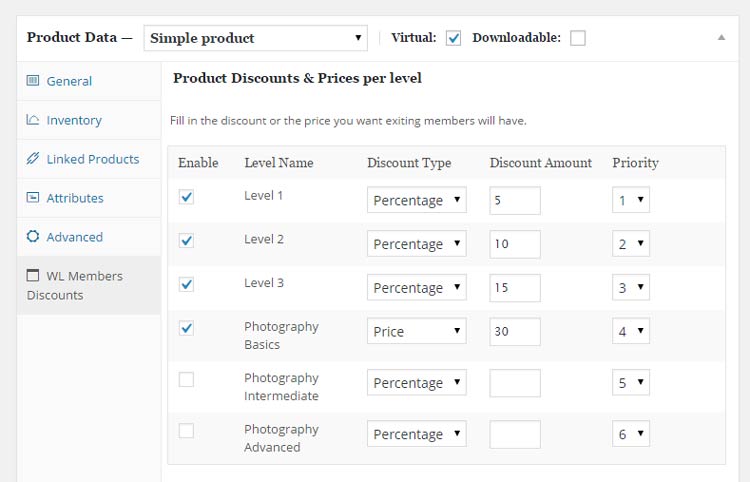
- Go to the WL Members Discounts tab and set your discounts for the relevant membership levels
Here is a screenshot of the WL Members Discounts tab:
[note note_color="#ffeee6"]
Special Discount for Purchasing One of the Bundles:
Wishlist Member WooCommerce Plus Bundle (20% Discount) that includes:
- Wishlist Member WooCommerce Plus Plugin
- The External Membership Sites Add-Ons Bundle
- The Member Registration Add-On
- The Custom Post Type Add-On
The Ultimate Wishlist Member WooCommerce Bundle (30% Discount) that includes:
- Wishlist Member WooCommerce Members Discounts Plugin
- Wishlist Member WooCommerce Plus Plugin
- Wishlist Member WooCommerce Plus – External Membership Sites Add-Ons Bundle
- Wishlist Member WooCommerce Plus - Variable Products Add-On
- Wishlist Member WooCommerce Plus – Member Registration Add-On
- Wishlist Member WooCommerce Plus – Custom Post Type Add-On
[/note]
Screenshots
- WL Members Discounts Tab
Videos
Video #1 - How to Grant Your WishList Members Discounts on Your WooCommerce Products:
Video #2 - How to Setup Discount Priority to Multiple WishList Membership Levels Registration via WooCommerce
Requirements
| Requirement | Minimum |
|---|---|
| WordPress | 5.3 and higher |
| Wishlist Member | 2.8 and higher |
| WooCommerce | 2.3 and higher |
Faqs
General
The short answer is No, Wishlist Member WooCommerce Members Discounts is a stand-alone plugin. However, if you do want to integrate Wishlist Member and WooCommerce and sell membership levels through the WooCommerce platform then we highly recommend you to get Wishlist Member WooCommerce Plus as its purpose is to easily integrate Wishlist Member and WooCommerce in 1-Click and it allows you to keep track of all your membership products from one place. You can go over all the benefits of Wishlist Member WooCommerce Plus and see how you can benefit from it in the product's page .
Yes, you are not limited in any way to granting discounts, you can set different prices (fixed / percentage) to different membership levels so that some will even pay more than the product's regular price.
No, because the member already sees the new price as it is calculated automatically with the discount, when he will add it to the cart, it will already include the appropriate discount.
Yes, you can apply discounts to any type of product that you sell through WooCommerce, whether it is a physical product, a downloadable product etc.
Wishlist Member WooCommerce Members Discounts does indeed support variations, however, it can only work when setting the discount to be a percentage and not fixed price. If the discount is less than 1 dollar it will round the price. The discount will be reflected to the member after he will choose the relevant variation from the drop-down.
As far as we know, the plugin does not conflict with any other plugin. Wishlist Member WooCommerce Members Discounts a very strict code method so the chances that it’s causing any problem are very low. If you have any problems or conflicts, please contact the support department.
You will need to use WooCommerce version 2.3 and higher
No, Wishlist Member WooCommerce Members Discounts is a Wishlist Member dedicated plugin.
If you haven't found your answers in the product's page and in the manual, please contact our support team and we will get back to you shortly