
MemberPress WooCommerce – Smart Bridge
Sell and manage MemberPress memberships through WooCommerce with true two-way synchronization
Description
Sell MemberPress Memberships Through WooCommerce, with Any Payment Gateway, and Keep Both Sides in Sync
MemberPress is great at memberships: access rules, protected content, courses and member management.
WooCommerce is great at selling: unlimited payment gateways, a full tax engine, coupons, a cart that takes several products at once, and the checkout your customers already know.
MemberPress WooCommerce - Smart Bridge connects the two. WooCommerce handles the sale, MemberPress handles the membership, and every purchase, renewal, refund and cancellation stays in sync between them, in both directions.
Unlimited Payment Gateways
MemberPress supports a small set of payment gateways. WooCommerce supports hundreds.
With Smart Bridge, members pay through any payment gateway that works with WooCommerce: Stripe, PayPal, Square, Amazon Pay, Klarna, Mollie, Authorize.net, local and regional gateways, bank transfer and more. As soon as the order is paid, MemberPress access is granted automatically.
No custom gateway development, and no second checkout just for your memberships.
Taxes, Coupons and Checkout Stay in WooCommerce
Selling in several countries or states? Let WooCommerce do what it does best.
- Taxes - WooCommerce tax rates, VAT, sales tax and any WooCommerce tax extension calculate and collect tax on membership products exactly like on any other product. There's no separate tax setup to maintain in MemberPress for these sales.
- Coupons and discounts - use WooCommerce coupons on membership products
- One cart - customers can buy several memberships, or memberships together with physical and digital products, in a single order
- Your checkout - keep your own WooCommerce checkout page and checkout extensions, including the block-based checkout
In MemberPress, each purchase is recorded as a transaction with the product amount, and that amount is updated when an order is edited, so your membership records always match the real sale.
Real Two-Way Sync
Most integrations only work in one direction: WooCommerce sells, MemberPress grants access, and that's where it ends.
The problem shows up later. Someone revokes a member's access in MemberPress, and WooCommerce Subscriptions keeps charging the customer's card every month until they notice and complain.
Smart Bridge closes that gap:
- WooCommerce → MemberPress: completed and processing orders grant access, refunds revoke it, pending and on-hold orders keep the membership pending, and you choose what a cancelled order does
- MemberPress → WooCommerce: refunding, deleting or expiring a membership transaction, or cancelling a MemberPress subscription, cancels the matching WooCommerce subscription
- Loop protection on both sides: a change made on one side never bounces back and forth between the two
Two-way sync is switched on per product mapping, not site-wide, so simple one-off products keep the simple behaviour.
Manage Members From the Side You Work In
Your support team works in MemberPress and your accountant works in WooCommerce? Both stay right.
- Manage access in MemberPress - cancel or revoke a membership there and, with two-way sync, the WooCommerce billing stops too
- Manage orders in WooCommerce - refund, cancel or edit an order and the membership follows
- Choose what a refund does - revoke access immediately, keep it until the paid period ends, or never revoke
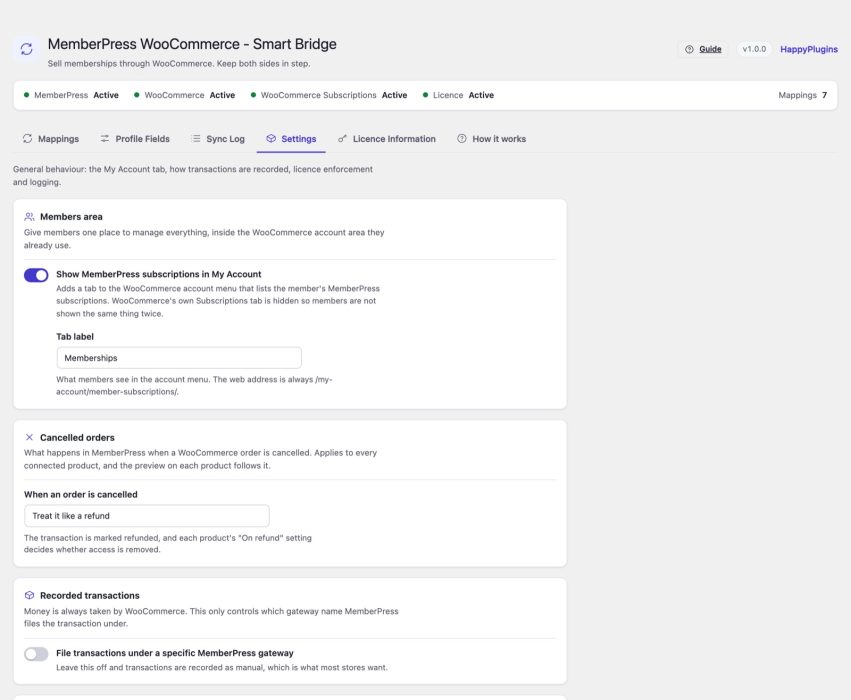
- Choose what a cancelled order does - treat it like a refund, set the membership to pending, or leave access unchanged
- File transactions under the MemberPress gateway you choose, so MemberPress reports stay clean
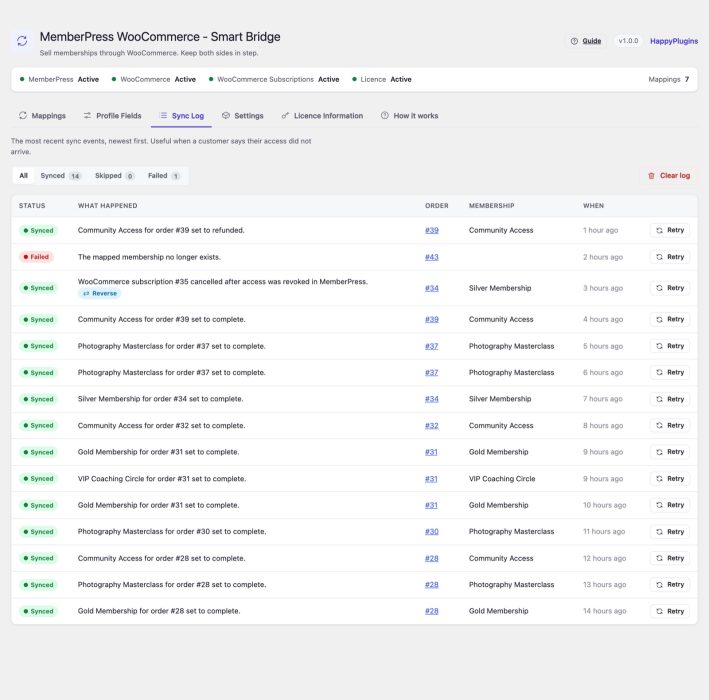
- Sync log - the last 200 sync events, filterable by outcome, with one-click retry for any order
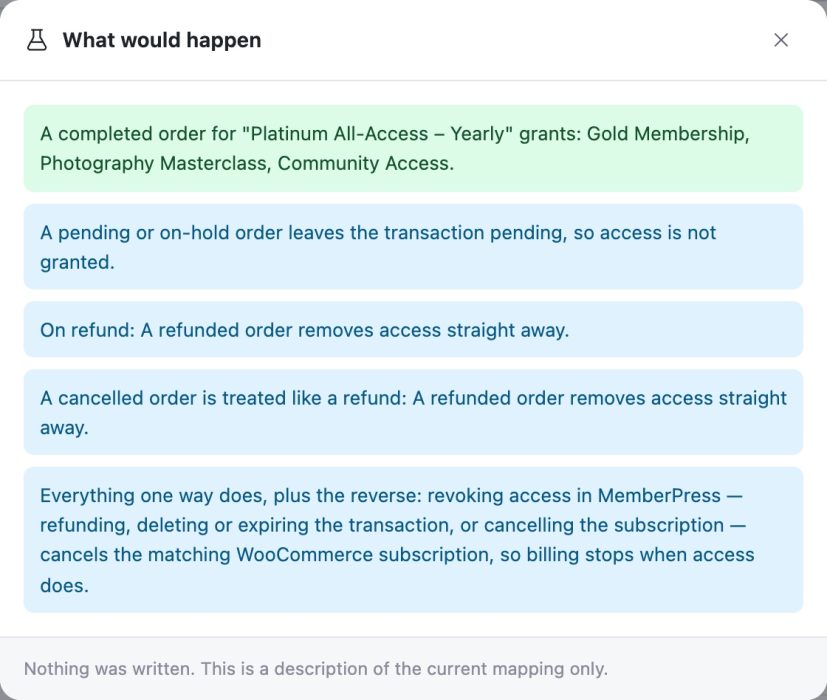
- Mapping preview - see what a completed order, a pending order and a refund would do before a customer ever buys
- Status strip - dependency, licence and mapping health, plus recent failures, on every screen
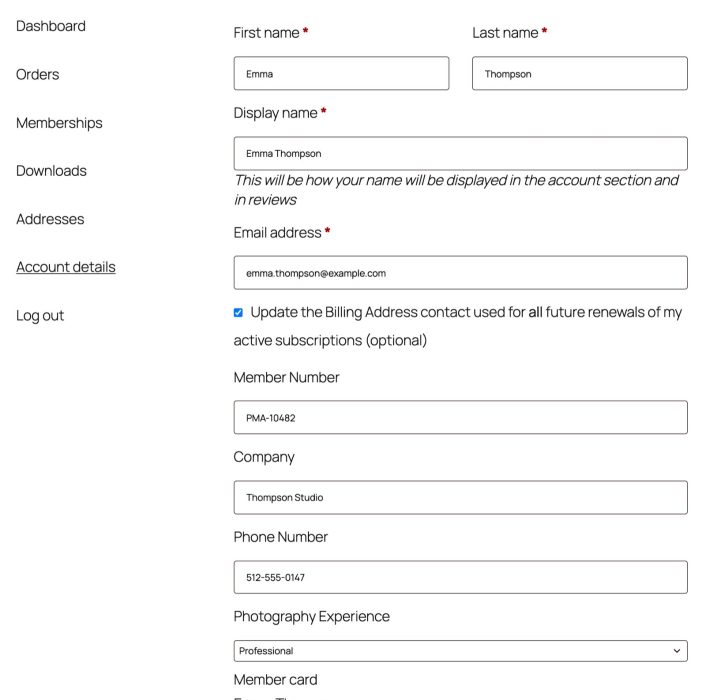
Members manage their own details too: show their MemberPress subscriptions and MemberPress profile fields right inside the WooCommerce My Account page.
Connect Products to Memberships by Drag and Drop
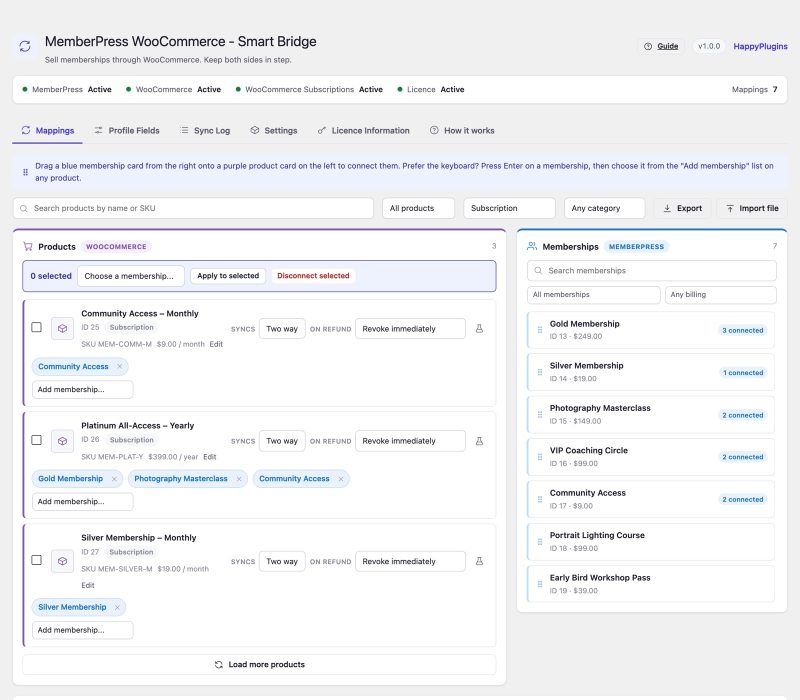
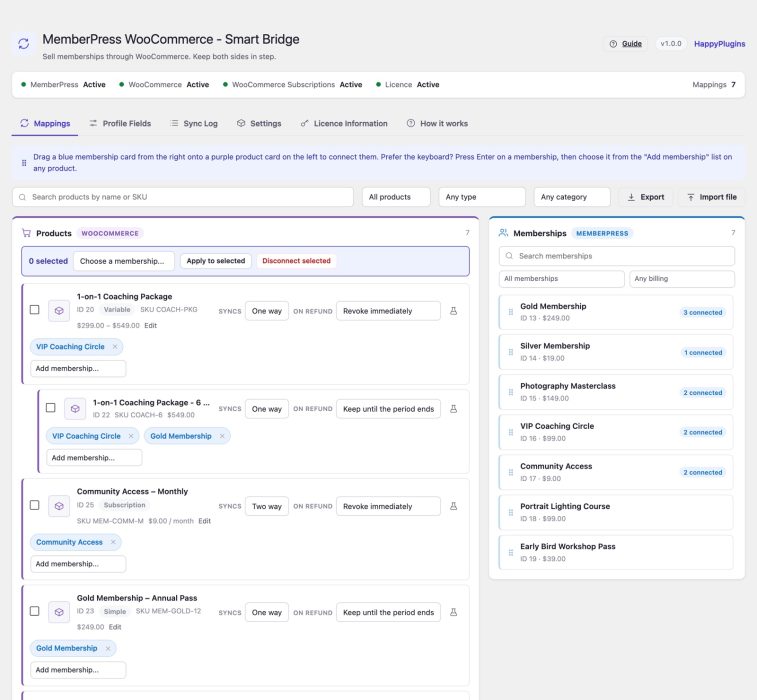
The mapping workspace shows your WooCommerce products on the left and your MemberPress memberships on the right. Drag a membership onto a product and they're connected. Prefer clicking? Every card also has a click-and-choose control.
- One product can grant several memberships at once
- Variations can be mapped individually or inherit their parent product's mapping
- Filter products and memberships by search, connection status, type and category
- Bulk connect or disconnect many products at once
- Export and import mappings as JSON, so a setup moves cleanly from staging to live
Built Right, Down to the Details
Syncing memberships looks simple until real orders arrive. Smart Bridge gets the details right, so your records stay accurate and your store stays secure:
- Accurate revenue in MemberPress - when one product grants several memberships, the price is split between them, so every sale is counted once and the amounts always add up to what the customer paid
- Every product line recorded on its own - two products in one order that grant the same membership each keep their own amount and their own refund rule
- Every paid order syncs - including orders created already paid, such as orders you add manually in the admin
- Amounts stay up to date when an order is edited
- The right subscription, every time - two-way sync only ever cancels the customer's own matching WooCommerce subscription
- Secure accounts for guest buyers - a strong generated password and a unique username
- Secure and lightweight - every admin action checks permissions, and scripts load only on the plugin's own screen
- Speaks your language - translated into German, Russian and Arabic, with a language setting that follows WordPress automatically
- Privacy-ready - works with the WordPress Export and Erase Personal Data tools, and adds suggested text to your privacy policy guide
Please Note: MemberPress and WooCommerce are required. WooCommerce Subscriptions is required for recurring memberships and for the MemberPress → WooCommerce half of two-way sync.
Switching From the MemberFix "MemberPress - WooCommerce" Plugin?
Smart Bridge detects it automatically and pauses its own syncing while it's active, so no order is ever written to MemberPress twice.
One click imports your existing mappings and settings and deactivates the old plugin. You see a full preview of what will be imported before anything is written, and imported mappings behave exactly as before, so nothing about your store changes on the day you switch.
Ready to Grow? Upgrade to MemberPress WooCommerce Plus
Need revenue dashboards, activity logs, or add-ons for membership discounts, corporate accounts and external membership sites? MemberPress WooCommerce Plus is our full-featured integration.
When you install Plus, Smart Bridge prepares your site for it: mappings are converted, your sync history is copied, and every order that was already synced is marked, so no member is ever granted a membership twice. Refunds and cancellations on past orders keep working after the move.
Features
Unlimited Payment Gateways
Accept membership payments through any payment gateway that works with WooCommerce: Stripe, PayPal, Square, Amazon Pay, Klarna, Mollie, Authorize.net, regional gateways, bank transfer and more.
- Paid orders (processing or completed) grant MemberPress access automatically
- Orders awaiting payment, such as bank transfers on hold, keep the membership pending until the payment is confirmed
- Choose which MemberPress gateway the transactions are filed under, or keep them as manual
Taxes, Coupons and Checkout
- Taxes are calculated and collected by WooCommerce, using your WooCommerce tax rates or any WooCommerce tax extension (VAT, sales tax and more)
- Coupons work on membership products like on any WooCommerce product
- Several memberships, or memberships plus other products, can be bought in a single order
- Accurate transaction amounts - the MemberPress transaction amount is updated when an order is edited or partially refunded
- Orders created already paid are synced too, not only orders that change status
Two-Way Sync
Choose the sync direction for each product mapping.
One way (WooCommerce → MemberPress) - WooCommerce orders grant, pend and revoke MemberPress access.
Two way - everything above, plus the reverse: cancelling, expiring, pausing or resuming the membership in MemberPress is mirrored onto the customer's matching WooCommerce subscription.
- Only a move out of an active state counts as a cancellation, so a renewal waiting for its next payment is never cancelled by mistake
- Only transactions created by the plugin are acted on, so memberships granted directly in MemberPress are never touched
- A WooCommerce refund that was mirrored into MemberPress can't bounce back and cancel the subscription that caused it
Refund Behaviour Per Mapping
Decide what a WooCommerce refund does to the membership, product by product:
- Revoke immediately - access ends the moment the order is refunded
- Keep until the period ends - the member keeps what they already paid for
- Never revoke - the refund doesn't affect access at all
Cancelled Orders, Your Choice
Decide once, in the settings, what a cancelled WooCommerce order does in MemberPress. The mapping preview on every product follows your choice:
- Treat it like a refund - each product's refund setting decides whether access is removed
- Set the transaction to pending - access is removed, without recording a refund
- Leave access unchanged - cancelling an order changes nothing in MemberPress
The Mapping Workspace
- Drag and drop memberships onto products, with a click-and-choose alternative on every card
- Colour-coded sides - WooCommerce on the left, MemberPress on the right
- Fast with large catalogues - products load a page at a time, so thousands of products open instantly
- Filters on both sides - search, connected or not, product type, billing type and categories
- Multiple memberships per product, and per-variation mappings that can inherit from the parent product
- Bulk actions to connect or disconnect many products at once
- Export and import mappings as JSON, matched on SKU and membership title
Membership Management, Sync Log and Mapping Preview
Manage from either side - revoke access in MemberPress and, with two-way sync, the WooCommerce subscription is cancelled; refund or cancel in WooCommerce and the membership follows.
Sync log - see the last 200 sync events, filter by outcome, and retry any order in one click. Perfect for the moment a customer says their access didn't arrive.
Mapping preview - see exactly what a completed order, a pending order and a refund would do for any product, without writing anything.
WooCommerce My Account Integration
MemberPress subscriptions tab - optionally show members their MemberPress subscriptions inside the WooCommerce My Account page, replacing WooCommerce's own tab so they don't see the same thing twice.
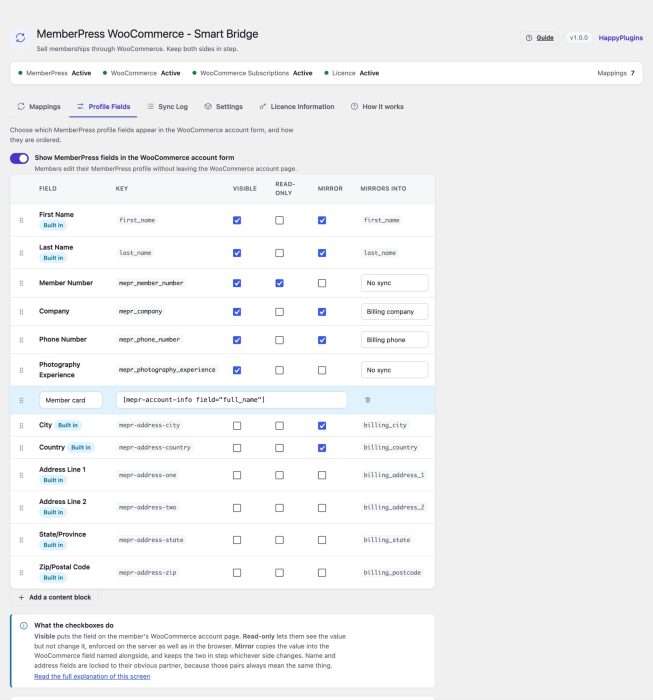
MemberPress profile fields in the WooCommerce account form:
- Drag and drop to reorder fields
- Make any field read-only (enforced on the server, not just in the browser)
- Mirror a field into a chosen WooCommerce billing or shipping field
- Add content blocks (any shortcode) anywhere in the form
Guest Checkout Support
A membership has to belong to a user account. When a guest buys a membership product, an account is created automatically with a unique username and a secure generated password, and attached to the order.
Easy Migration From MemberFix
- Detects the MemberFix "MemberPress - WooCommerce" plugin and pauses syncing while it's active, so orders are never processed twice
- Previews every mapping and setting it found before importing anything
- Imports mappings and settings and deactivates the old plugin in a single step
- Never deletes the other plugin or its data
A Safe Upgrade Path to MemberPress WooCommerce Plus
When MemberPress WooCommerce Plus is installed, a "Prepare this site for Plus" panel converts your mappings, copies your sync history into the Plus activity log, and marks every synced order so no membership is ever granted twice. Past orders are handed over too, so refunds keep working after you switch. Nothing is deleted, so you can always change your mind.
Done Right: Accurate, Reliable and Secure
Accurate membership records
- Revenue split across memberships - a product that grants several memberships records each one's share of the price, in proportion to its MemberPress price, rounded so the shares add up exactly to what was paid (after discounts, before tax)
- One transaction per product line - two products in the same order that grant the same membership are recorded separately, each with its own amount and refund behaviour
- Amounts refreshed whenever an order is edited, not only when it is first synced
- No missed orders - orders are synced when their status changes and when they are created already paid
Reliable two-way sync
- Cancels the right subscription - resolved through the customer's own WooCommerce subscriptions
- Loop-proof - both directions share one lock, so a change can never bounce back and forth
- Hands off what it didn't create - memberships granted directly in MemberPress are never touched
Secure by default
- Guest checkout accounts get a strong generated password and a unique username, and are attached to the order
- Every admin action verifies a security token and the user's permissions
- Read-only profile fields are enforced on the server, not just in the browser
Fast and clean
- Admin scripts and styles load only on the plugin's own screen
- Front-end styles ship as a proper stylesheet, and inline scripts respect Content-Security-Policy nonces
- A readable sync log inside the plugin, instead of messages piling up in your server error log
Built for Modern WooCommerce
- Compatible with High-Performance Order Storage (HPOS)
- Compatible with the block-based cart and checkout
- Admin assets load only on the plugin's own screen, so the rest of your dashboard stays fast
Translated, With a Language Setting
- Included translations: German, Russian and Arabic, using WooCommerce's own wording for order statuses and account screens
- Automatic language follows each admin's WordPress profile, and the site language on the store
- Or pin the plugin to any installed translation, including ones you add yourself
- Translation-ready, with a translation template for any other language
Privacy and GDPR
- Works with the WordPress Export Personal Data and Erase Personal Data tools
- Suggested privacy policy text in Settings > Privacy, ready to adapt for your store
- Order data is erased only when WooCommerce is set to remove it, so both plugins treat orders the same way
Licence Information
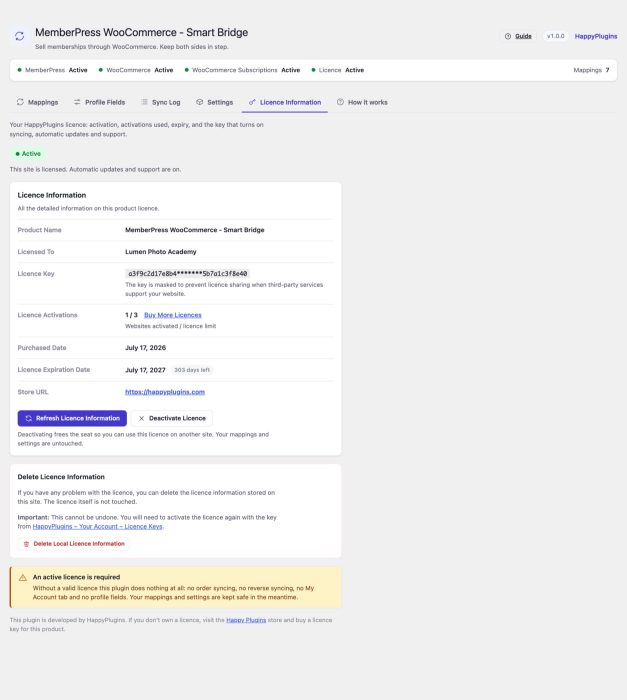
Activate, refresh and deactivate your licence right inside the plugin, and see your activations, purchase date and expiry date at a glance. An active licence includes automatic updates and support.
Screenshots
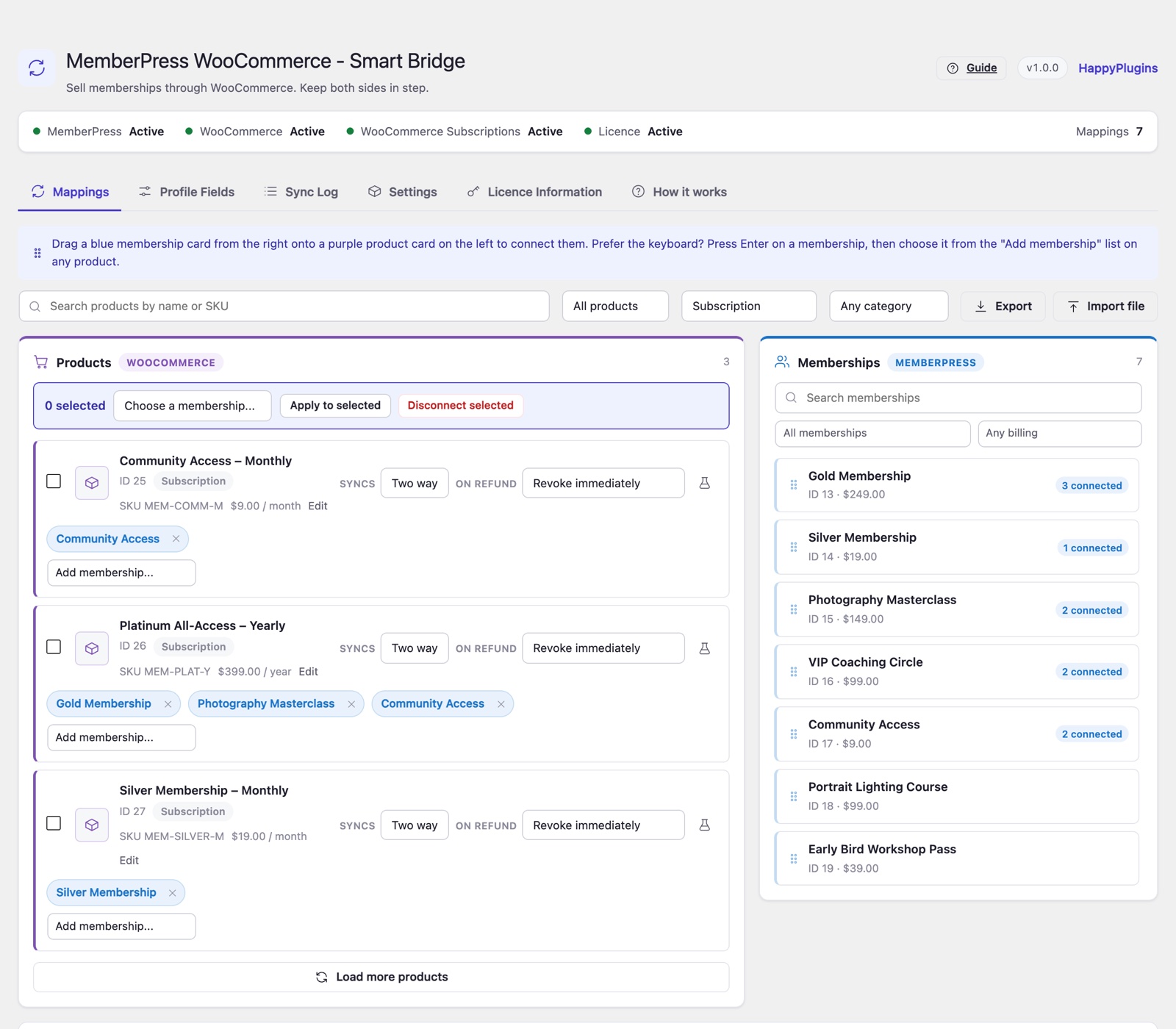 MemberPress WooCommerce - Smart Bridge - two-way sync mappings for WooCommerce subscription products
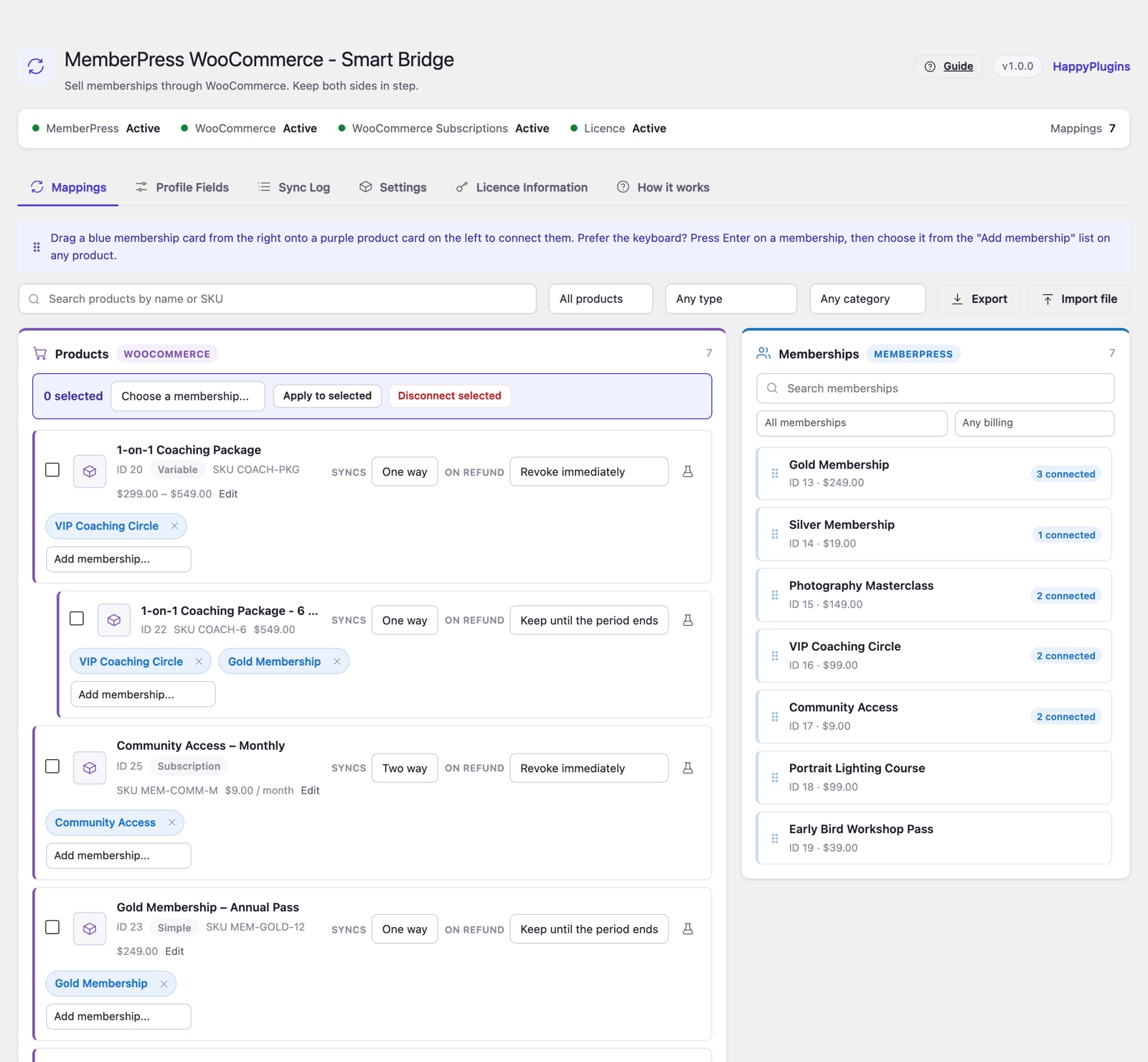 MemberPress WooCommerce - Smart Bridge - drag and drop mapping of WooCommerce products to MemberPress memberships
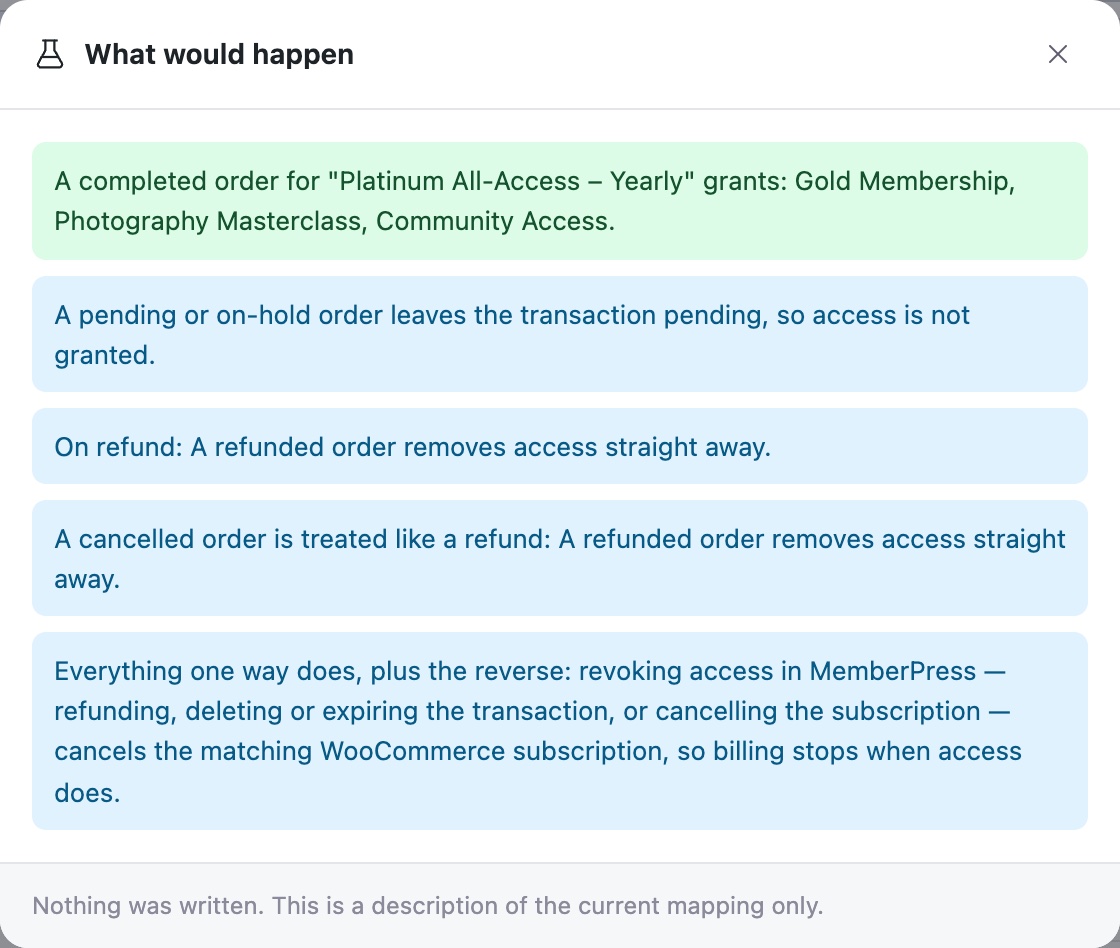 MemberPress WooCommerce - Smart Bridge - mapping preview showing what a purchase, pending order, refund and cancellation would do
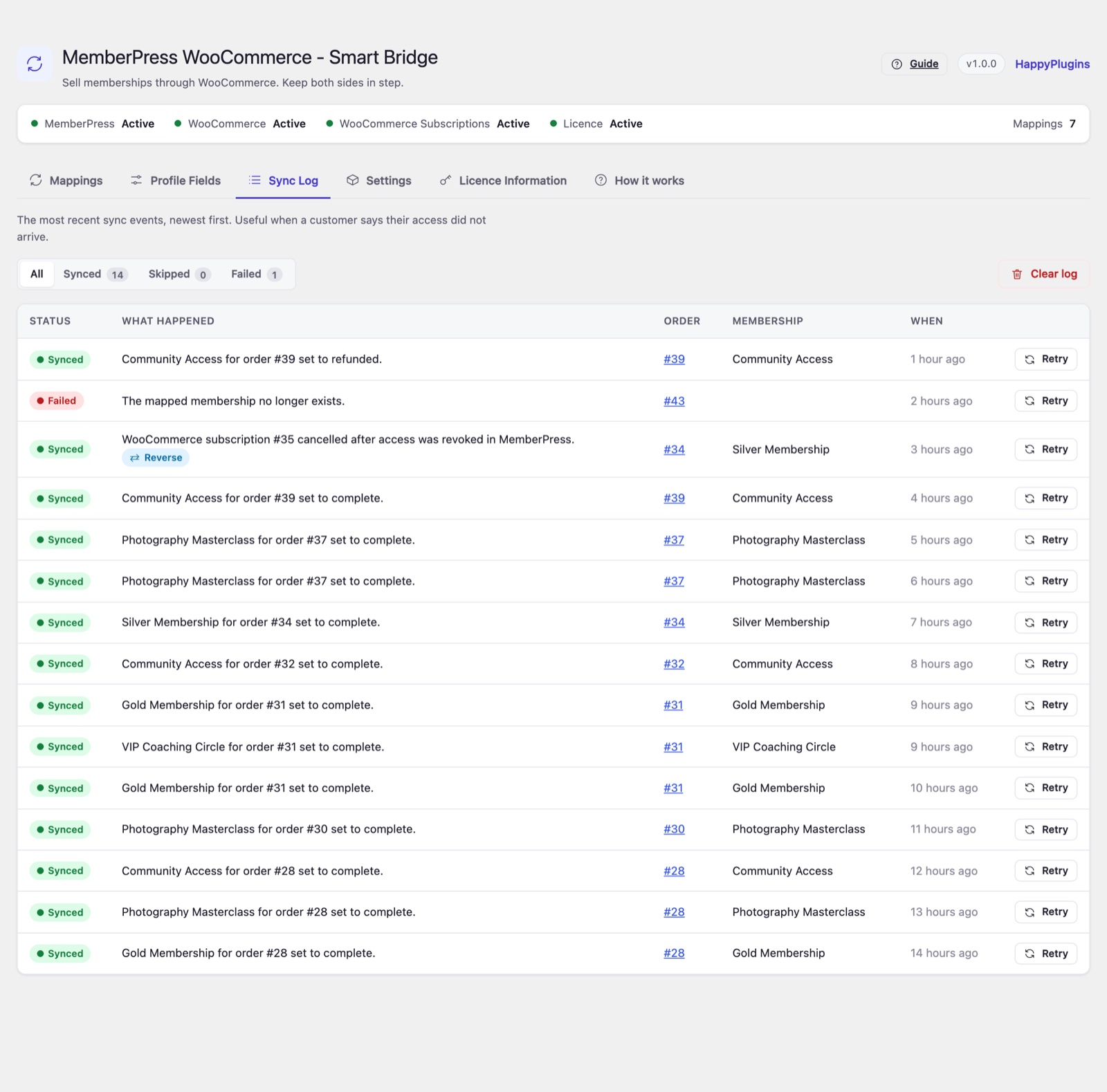 MemberPress WooCommerce - Smart Bridge - sync log with outcome filters and one-click retry
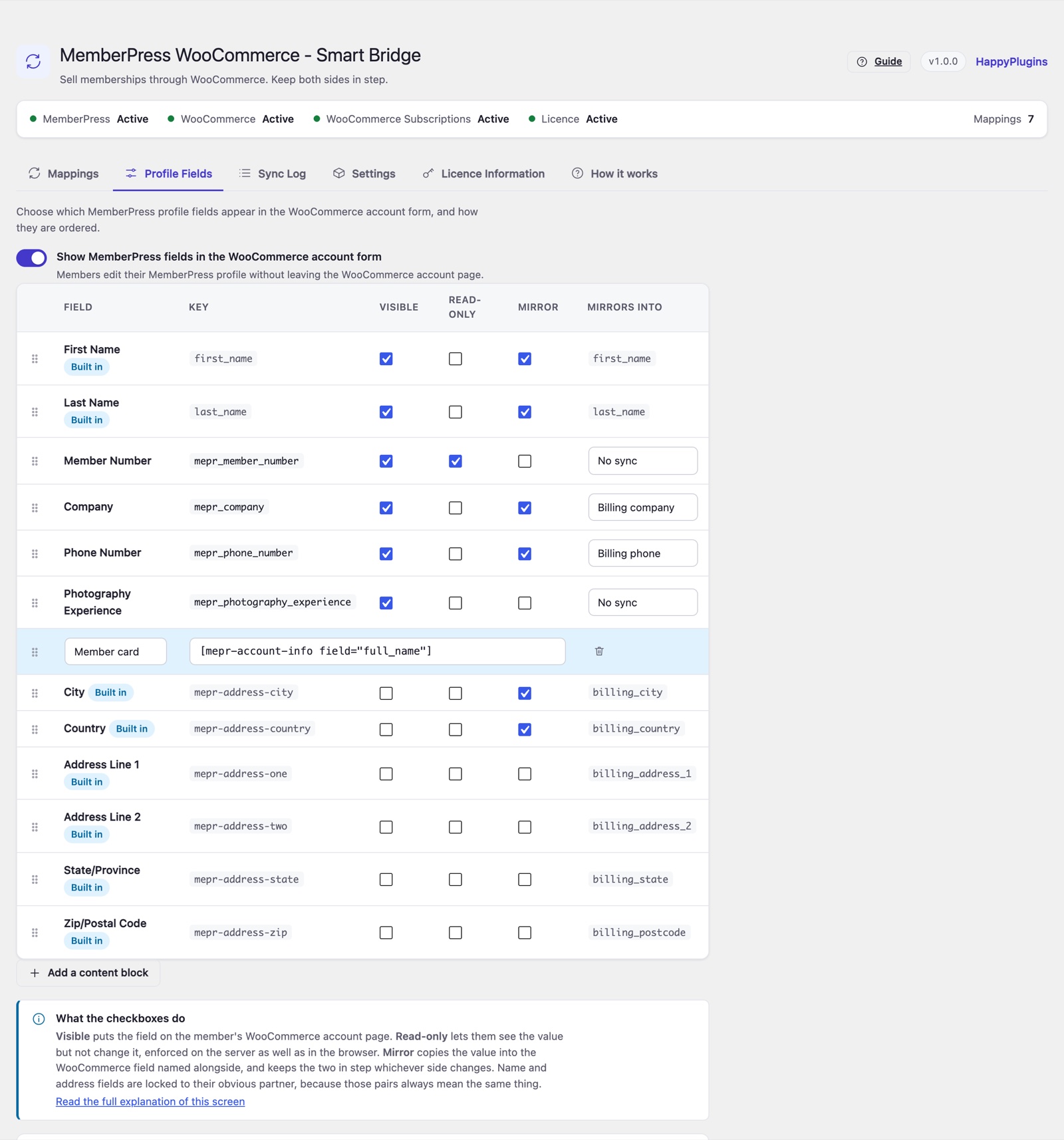 MemberPress WooCommerce - Smart Bridge - Profile Fields screen for MemberPress fields in the WooCommerce account form
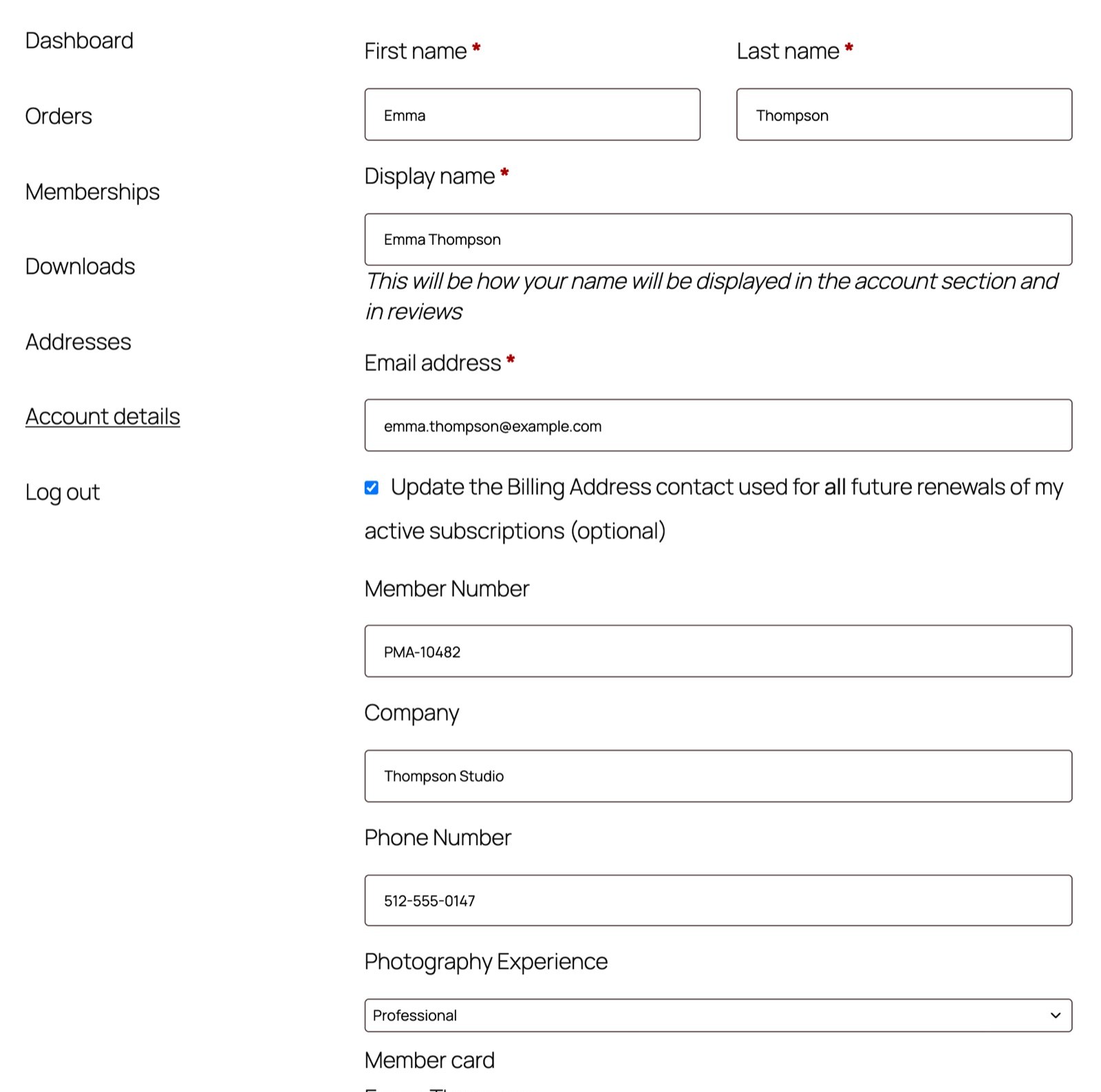 MemberPress WooCommerce - Smart Bridge - MemberPress profile fields on the WooCommerce My Account page
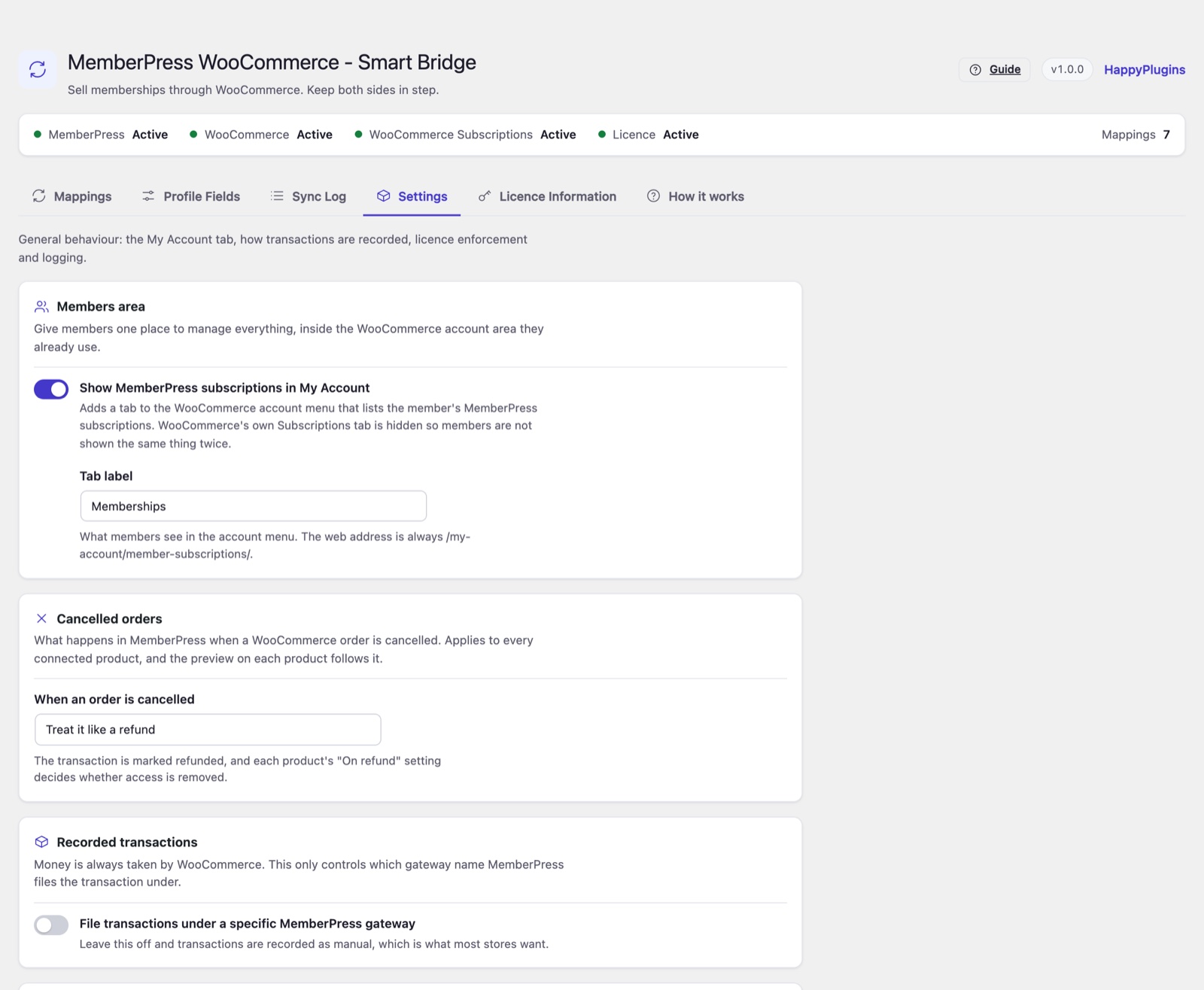 MemberPress WooCommerce - Smart Bridge - settings for the members area, cancelled orders and recorded transactions
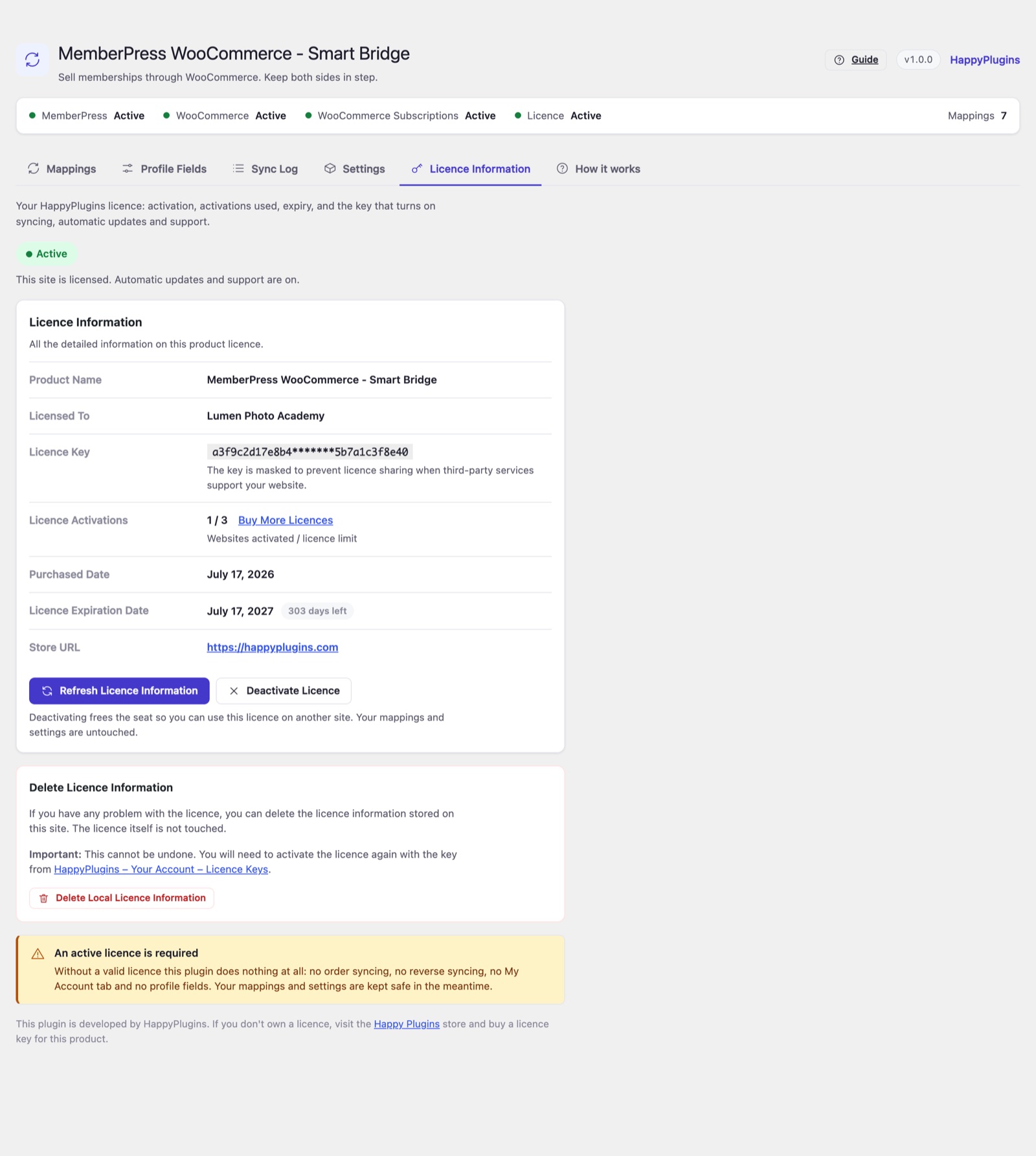 MemberPress WooCommerce - Smart Bridge - licence information tab
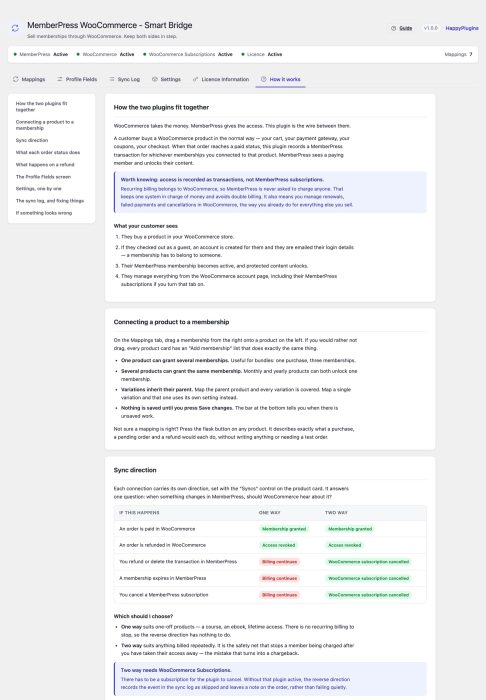
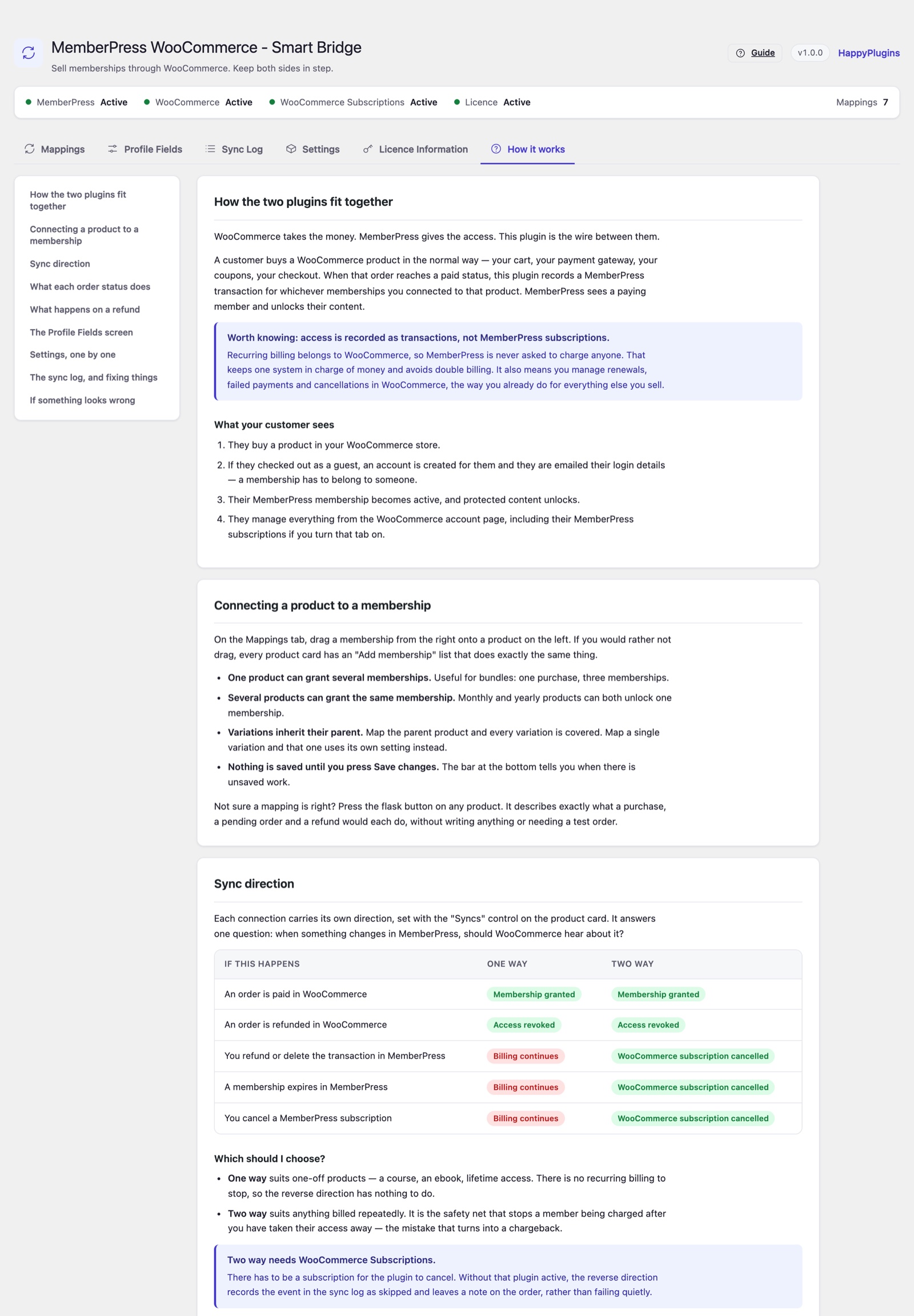 MemberPress WooCommerce - Smart Bridge - built-in How it works documentation
Requirements
| Requirement | Minimum |
|---|---|
| WordPress | 5.6 and higher |
| PHP | 7.4 and higher |
| MemberPress | Required |
| WooCommerce | 8.0 and higher |
| WooCommerce Subscriptions | Optional - required for recurring products and two-way sync |
Faqs
General
One-way sync means WooCommerce orders control MemberPress access: a completed order grants the membership and a refund revokes it. Two-way sync adds the reverse. Refunding, deleting or expiring the membership transaction in MemberPress, or cancelling a MemberPress subscription, cancels the customer's matching WooCommerce subscription, so the billing stops when the access does. You choose the direction separately for each product mapping.
Only for recurring products and for the MemberPress → WooCommerce half of two-way sync. Everything else works without it. If a two-way mapping needs WooCommerce Subscriptions and it isn't active, the sync log records the event as skipped rather than failing silently.
Yes. Drop as many memberships as you need onto a product, and a completed order grants all of them.
A variation uses its own mapping when it has one, and otherwise inherits the parent product's mapping.
You decide, per product mapping: revoke access immediately, keep access until the paid period ends, or never revoke.
You choose, in the settings: treat a cancelled order like a refund (each product's refund setting then applies), set the MemberPress transaction to pending so access is removed, or leave access unchanged. The mapping preview on every product shows the result of your choice.
A membership has to belong to a user account, so an account is created automatically with a unique username and a secure generated password, and attached to the order.
Open the Sync Log tab. It shows the last 200 sync events, can be filtered by outcome, and lets you retry any order in one click. Every product also has a mapping preview that shows what a completed order, a pending order and a refund would do before a customer buys.
Yes. Compatibility with both is declared, and orders are only accessed through the WooCommerce CRUD API, so the plugin behaves the same whichever order storage your store uses.
Yes. German, Russian and Arabic translations are included. A language setting lets the plugin follow WordPress automatically, or show one installed translation regardless of the site language. A translation template is included for any other language.
Yes. The plugin works with the WordPress Export Personal Data and Erase Personal Data tools, and adds suggested text to the privacy policy guide under Settings > Privacy.
Yes. Export your mappings as a JSON file and import it on the other site. Products are matched by SKU and memberships by title, so the file moves cleanly between sites.
Payments & Taxes
Any payment gateway that works with WooCommerce: Stripe, PayPal, Square, Amazon Pay, Klarna, Mollie, Authorize.net, regional gateways, bank transfer and more. WooCommerce takes the payment, and once the order is processing or completed, MemberPress access is granted automatically.
WooCommerce calculates and collects tax on membership products, exactly as it does for any other product, using your WooCommerce tax rates or any WooCommerce tax extension (VAT, sales tax and more). You don't need a separate tax setup in MemberPress for sales made through WooCommerce.
The membership stays pending while the order is on hold or awaiting payment, and access is granted as soon as the order moves to processing or completed.
Yes. WooCommerce coupons work on membership products, and a single order can contain several memberships, or memberships together with other products.
Each membership gets a MemberPress transaction for the amount the customer actually paid for it: the line total after coupons, before tax. When one product grants several memberships, that amount is split between them in proportion to their MemberPress prices, so the sale is counted once and the shares always add up to exactly what was paid. Amounts are refreshed whenever the order is edited.
Each product line gets its own MemberPress transaction, with its own amount and its own refund behaviour. If the order is refunded, access from a "revoke immediately" product is removed while access from a "keep until the period ends" product stays in place.
Migration
Yes. Smart Bridge detects that plugin and pauses its own syncing while it's active, so a purchase is never granted twice. One button imports its mappings and settings and deactivates it. You see a preview of everything that will be imported first, and nothing belonging to the other plugin is deleted.
No. Imported mappings are one-way and revoke access immediately on refund, and cancelled orders are set to pending, which is exactly how that plugin behaved. You can turn on two-way sync for each mapping whenever you're ready.
Yes. Install MemberPress WooCommerce Plus and Smart Bridge offers to prepare your site: mappings are converted to Plus product settings, your sync log is copied into the Plus activity log, and every order that was already synced is marked so no membership is granted twice. Past orders are handed over too, so refunds and cancellations on them keep working in Plus. Nothing is deleted, so you can change your mind.
Licensing
No. Without an active licence, order syncing, reverse syncing, the My Account tab and the profile fields are switched off, and the plugin explains why. Your mappings and settings are kept safe, and everything resumes as soon as a licence is activated.
In your HappyPlugins account under Licence Keys, or in the purchase receipt email. Enter it on the plugin's Licence Information tab.
Yes. Click Deactivate Licence on the Licence Information tab to free the seat, then activate the same key on the new site. Your mappings and settings are not affected.