
Wishlist Member Easy Digital Downloads Plus – External Membership Sites (AddOns Bundle)
Description
The External Membership Sites Add-Ons Bundle integrates Wishlist Member and Easy Digital Downloads and allows you to sell external Wishlist Member membership levels from your Easy Digital Downloads store.
[note note_color="#FFA07A"]
In order to use the add-ons bundle you need to also purchase Wishlist Member Easy Digital Downloads Plus core plugin
[/note]
So, if your Easy Digital Downloads store is installed on Domain A and you want to sell membership levels that are installed on Domain B, you will need to use the bundle to do it, for example:
Different Sub-Domains:
- Your Easy Digital Downloads store is located in - http://store.yourdomain.com
- Your Wishlist membership site is located in - http://membership.yourdomain.com
Different Directories:
- Your WooCommerce store is located in - http://yourdomain.com/store
- Your Wishlist membership site is located in - http://yourdomain.com/membership
Different Domains:
- Your WooCommerce store is located in - http://domain-one.com
- Your Wishlist membership site is located in - http://domain-two.com
What Add-Ons does the Bundle Include?
The bundle includes 2 add-ons:
- The External Membership Sites Add-On - The add-on is installed on your Easy Digital Downloads store and it collects all the important information about your membership products, including: the membership product name, level ID, status and more, and it allows you to manage all external products from one table
- The Remote Access Add-On - the add-on is installed on your Wishlist membership site, it connects between the two websites, and make sure that members who purchase a membership product from your store will be registered to the membership site correctly (both new and existing members)
How Many Licenses Will I Need for Each Add-On?
For every Easy Digital Downloads store you will need 1 license of:
- Wishlist Member Easy Digital Downloads Plus Plugin
- External Membership Sites Add-On
For every External membership site you will need 1 license of:
- Remote Access Add-On
For example:
If you want to sell all your products from one Easy Digital Downloads store, and you want to integrate your store's products to 3 membership sites you will need:
- Wishlist Member Easy Digital Downloads Plus Plugin & External Membership Sites Add-On >> 1 License for Each
- Remote Access Add-On >> 3 Licenses
If you want to sell all your products from 2 different Easy Digital Downloads stores, and you want to integrate all products from 2 stores to one membership site you will need:
- Wishlist Member Easy Digital Downloads Plus Plugin & External Membership Sites Add-On >> 2 Licenses for Each
- Remote Access Add-On >> 1 License
Can I Purchase More Licenses of the Remote Access Add-On Separately?
Yes, if you need to integrate multiple membership sites and you need more licenses (each membership site requires a license), you can purchase them separately in this link >> Purchase Remote Access Add-On
Features
Video Tutorials
In this tab you will find short video tutorials that guide you through the process of selling membership levels and / or pay-per-posts using Wishlist Member Easy Digital Downloads Plus:
How to Sell One or Multiple Membership Levels
Using Wishlist Member Easy Digital Downloads Plus you can sell one or multiple membership levels to both new and existing members, watch the short video tutorial to see how:
How to Sell One or Multiple Pay-per-Posts
Using Wishlist Member Easy Digital Downloads Plus you can sell one or multiple pay-per-posts to both new and existing members, watch the short video tutorial to see how:
How to Sell Multiple Types of Products:
Using Wishlist Member Easy Digital Downloads you can sell multiple types of products in one cart, including Wishlist Member membership level, pay-per-post content and even software, downloadable products etc.
In this video we demonstrate how easy it is to integrate Wishlist Member and Easy Digital Downloads to have the ability to do so:
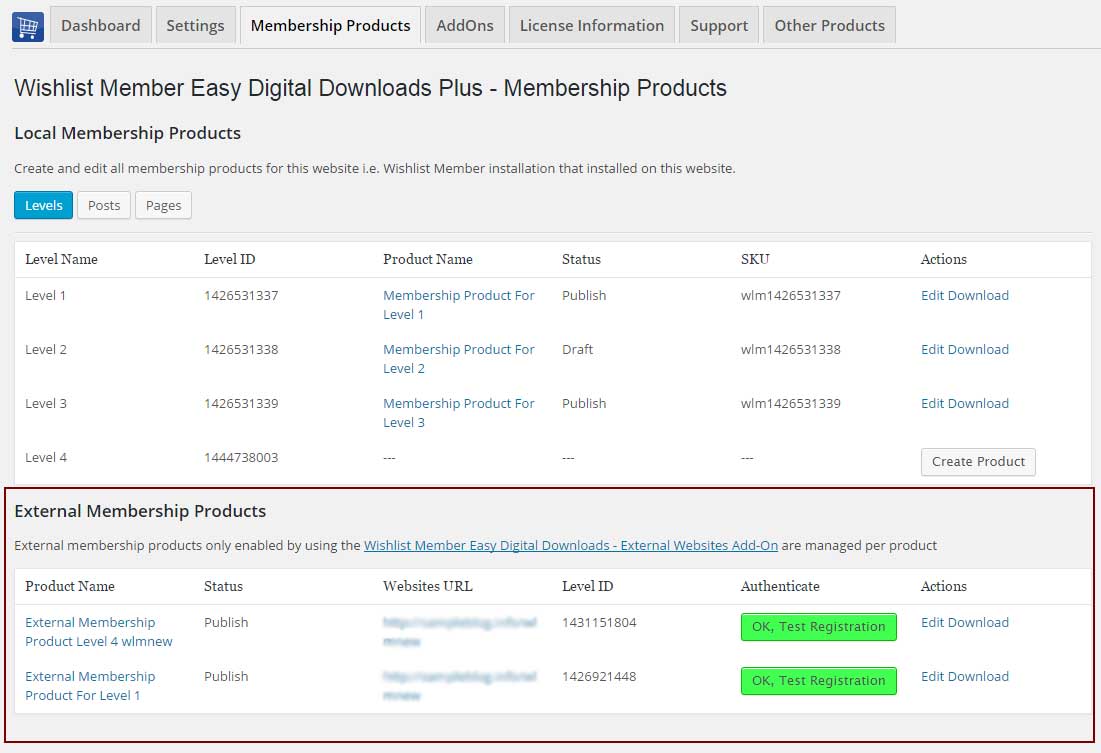
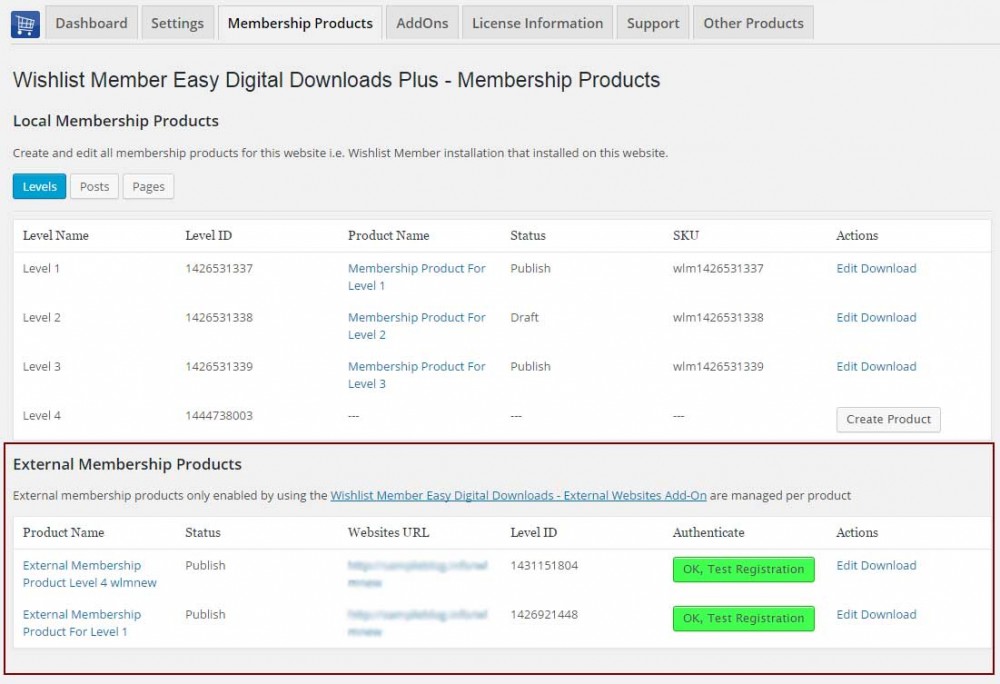
The External Membership Products Table
The External Membership Sites Add-on is installed on the same website where your Easy Digital Downloas store is and it allows you to manage all external products in one table.
The External Membership Products table will be displayed only after you install and activate the add-on.
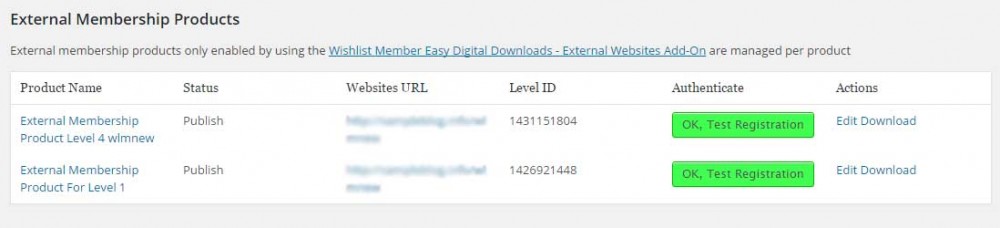
The information displayed in the table includes:
- Product Name – The product's name
- Status – The product's status, for example: published / draft / pending
- Website's URL – The URL of the membership site users will register to when purchasing the product
- Level ID – The membership level's ID
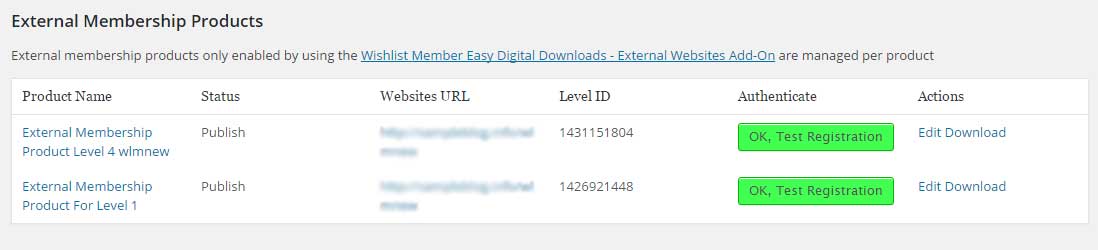
- Authenticate – Notifies you if the integration between your store and the membership site is successful for each product (will be explained further in the manual when we explain about the Remote Access add-on)
- Actions – You can click to edit the product's details
The External Membership Products table will automatically display all the membership levels and all posts and pages that are protected under the pay-per-post protection.
Screenshot:
The Remote Access Add-On
The Remote Access Add-On is installed on your membership site and not on your Easy Digital Downloads store website.
The Remote Access plugin connects between your online store and your membership site, and make sure that members will be registered to the membership site correctly (both new and existing members).
You must have the Remote Access Add-On installed in every external membership site you want to register members to.
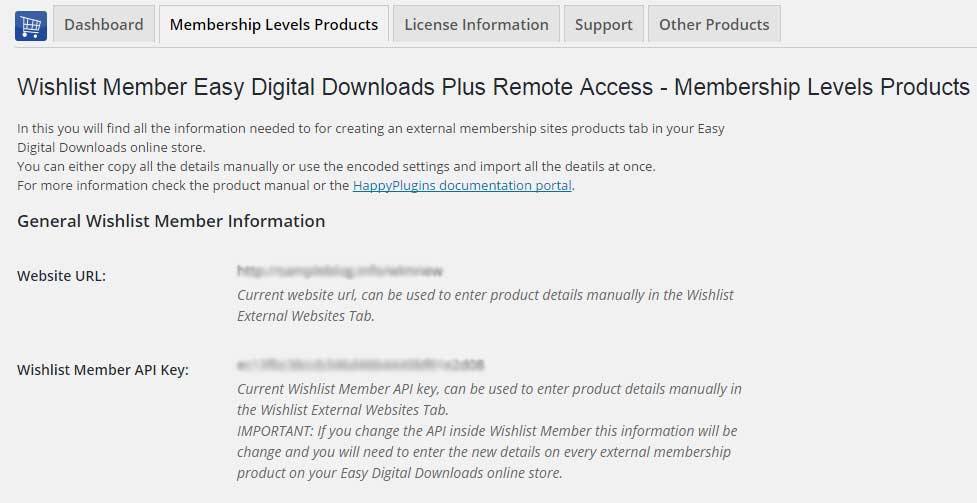
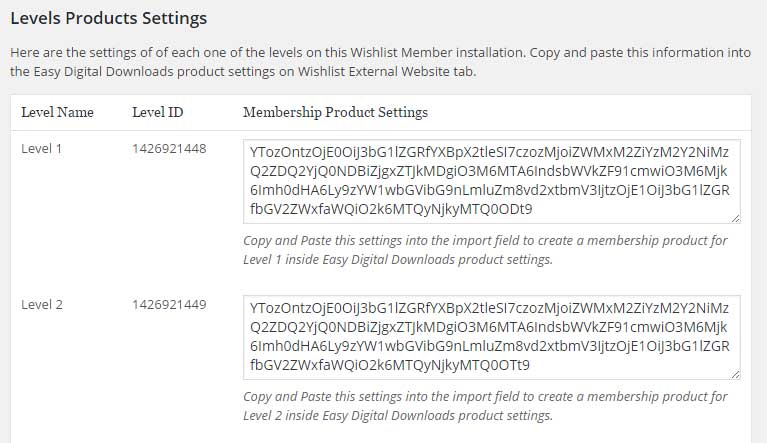
After you activate the Remote Access add-on, you will be able to see all the information you need in order to set the integration between your membership site and your Easy Digital Downloads store as seen in the screenshot below.
Screenshots:
1. General Wishlist Member information
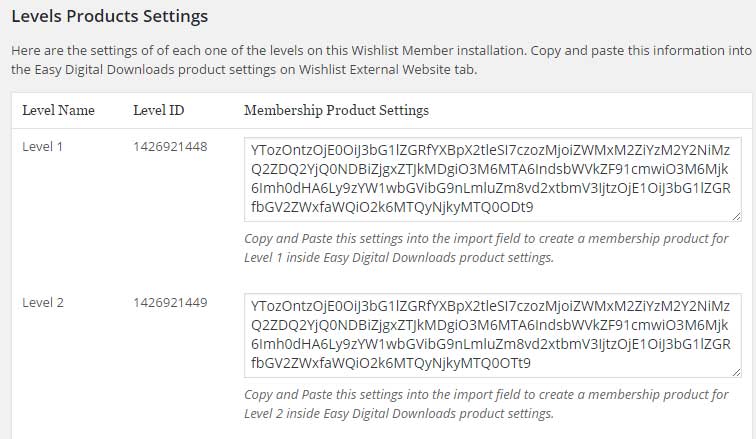
2. Encoded membership levels setting to easily copy-paste the details required for the external integration
Create External Membership Products in 3 Simple Steps:
Step #1 - Go to your membership site and copy the relevant level information from the plugin's settings as seen below
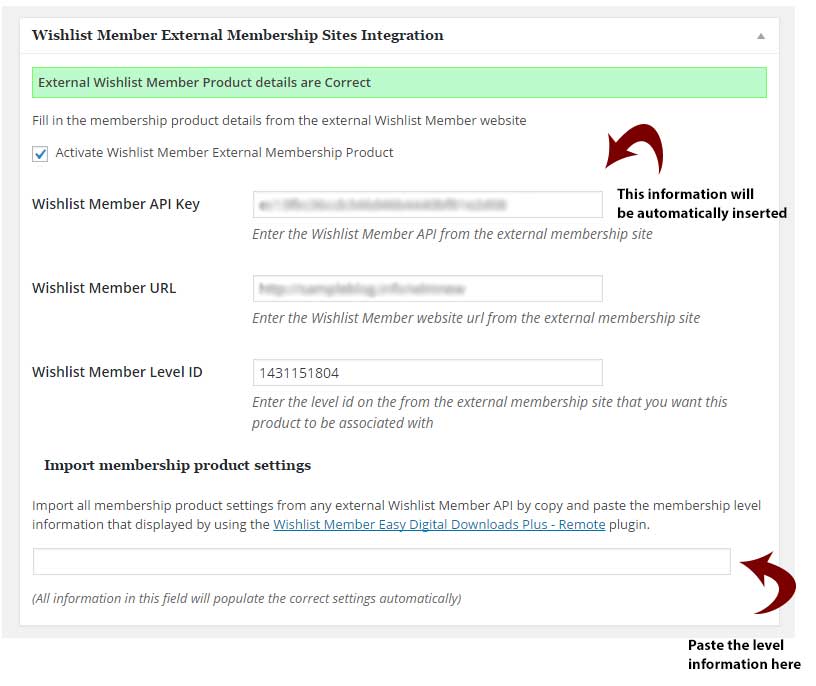
Step #2: Go to your EDD website > Downloads menu > New Download and paste the level information inside the relevant Meta box and publish.
The Wishlist Member API Key, website's URL and Level ID will be automatically inserted as seen below:
Step #3: Test the registration. Go to the Membership Products tab (on your EDD website) "External Membership Products". This table updates automatically every time you import a new level information from the membership site.
You can test the registration by clicking the "Test Registration" button. This message should appear on the screen: "Test registration completely successfully, an existing member has been added / upgraded, please check this membership site and delete the test member."
This means that every time a user purchases the relevant membership product from your EDD store he will be automatically added as a member and assigned with the correct membership level on your Wishlist Member membership site.
General Settings (Settings Tab)
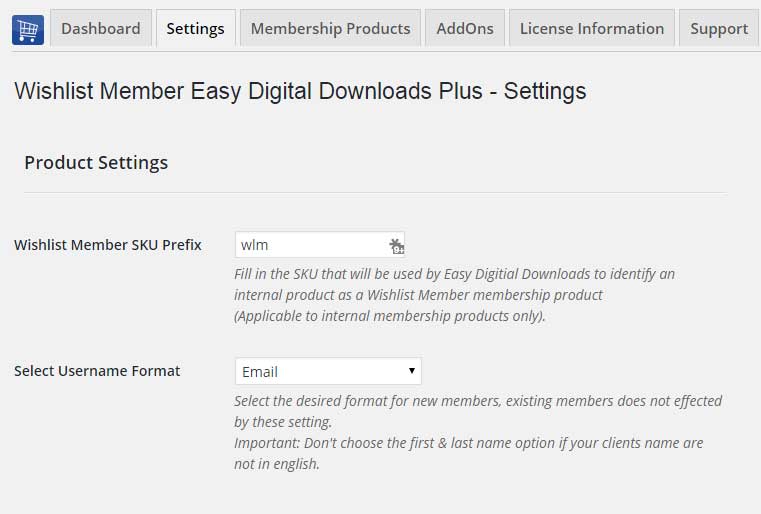
In the Settings tab you can update the following settings:
Product Settings:
- Wishlist Member SKU Prefix
- Select Username Format - Full email /email prefix / first and last name
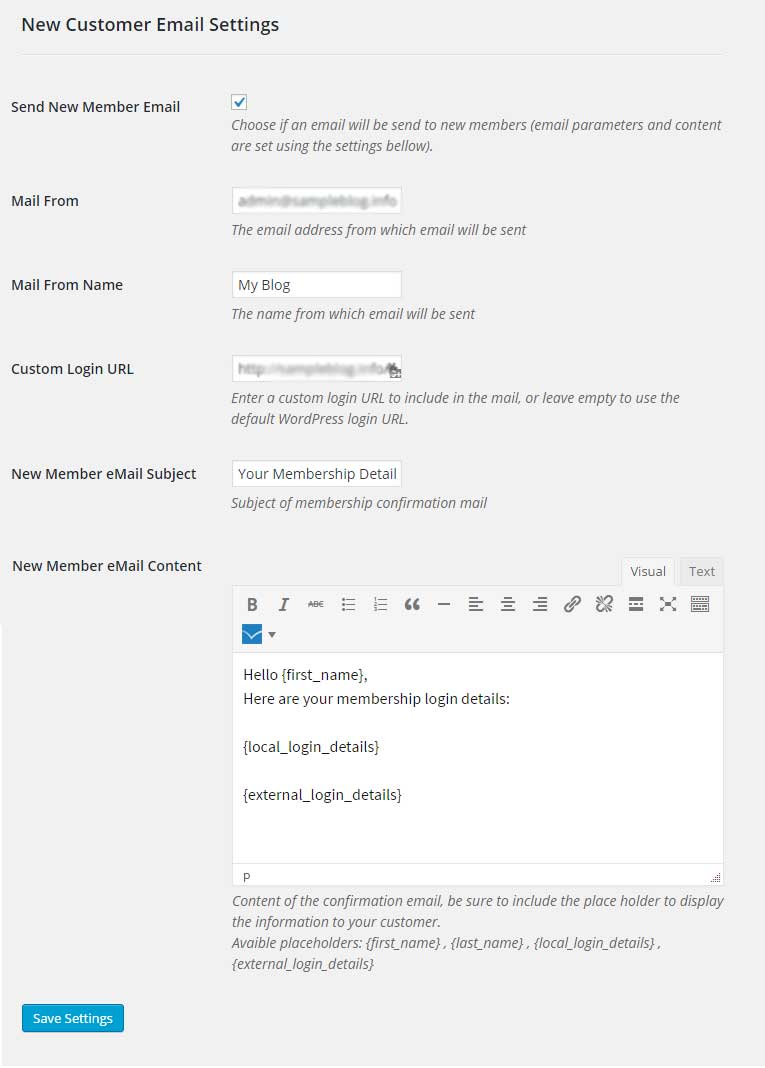
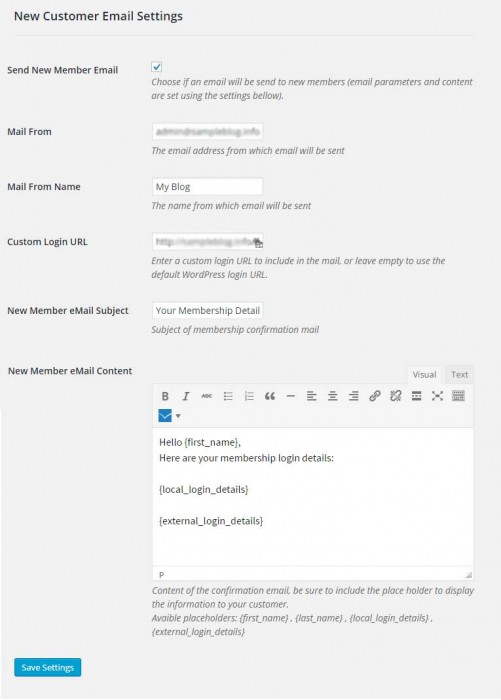
New Customer Email Settings:
- Send New Member Email – Check the box if you want to send an email to new members with their membership details
- Mail From – The email address from which emails will be sent
- Mail From Name – The name from which emails will be sent
- Custom Login URL – The login URL that will appear in the email
- New Member Email Subject – The subject of the email
- New Member Email Content – The content of the email
Screenshots
- The External Membership Products Table
- General Wishlist Member information
- Membership Products Settings
- Membership Level Setting
- Importing External Membership Product
- External Membership Products Table
- Product Settings
- New Customer Email Settings
Videos
How to Sell One or Multiple Membership Levels
How to Sell One or Multiple Pay-per-Posts
How to Sell Multiple Types of Products
Faqs
General
Version 3.0 and above
No, the External Membership Sites & Remote Access Add-Ons are an addition to the main plugin, you must also purchase Wishlist Member Easy Digital Downloads Plus for the add-ons to work.
If both Easy Digital Downloads and Wishlist Member are installed on the exact WordPress installation, you will not need the "External Membership Sites Add-Ons Bundle", only the main plugin - Wishlist Member Easy Digital Downloads Plus
Yes, because you have 2 different WordPress installations you will need to use the add-on. Examples of different domains are: 1. http://domain1.com & http://domain2.com (different domains) 2. http://domain1.com/woo & http://domain2.com/wlm (different directories) 3. http://woo.domain1.com & http://wlm.domain2.com (different sub-domains)
Yes, if you need to integrate multiple membership sites and you need more licenses (each membership site requires a licence), you can purchase them separately in this link >> Purchase Remote Access Add-On
Actually, it is very simple and easy to install and activate all 3 and make them work seamlessly. The process is very quick and requires only 3 simple steps. You can find all the information in our detailed manual.
As far as we know, the plugin does not conflict with any other plugin. Wishlist Member Easy Digital Downloads Plus keeps a very strict code method so the chances that it’s causing any problem are very low. If you have any problems or conflicts, please contact the support department .
No, Wishlist Member Easy Digital Downloads Plus is a Wishlist Member dedicated plugin.
If you haven't found your answers in the product's page and in the manual, please contact our support team and we will get back to you shortly