
Wishlist Bundles
Description
Wishlist Bundles allows you to sell unlimited number of membership levels in one purchase only and create complex bundles scenarios.
The plugin enables you to attach multiple membership levels to a specific "virtual level" so every time a "virtual level" is sold, the members gets immediate access to all levels attached to that virtual level.
This way, you will be able to create special scenarios by combining multiple levels and selling them as bundles without losing the flexibility of selling each level individually.
With Wishlist Bundles you will engage your members more easily and significantly increase your sales and revenues.
Ways You Can Create Bundles using Wishlist Member Plugin Only
There are 2 ways to create bundles by using Wishlist Member only:
1. Sequential Upgrade feature
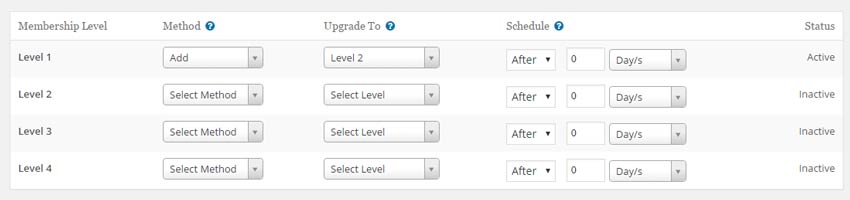
Using the Sequential Upgrade you can add / move members to any membership level after any number of days / weeks / months / years.
So, for example: if you want to determine that every member who purchase access to Level 1 will also be added to level 2 you can set that Level 2 will be added to Level 1 on day 0.
The main downside of this method is that you cannot create multiple bundles for every membership level.
2. From the Manage Membership Levels settings
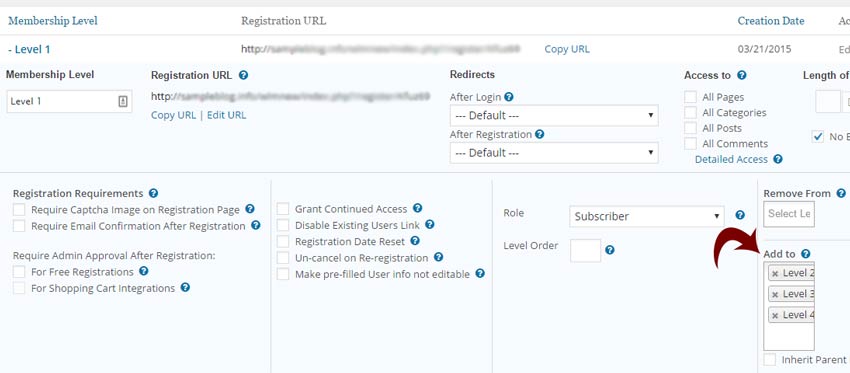
From the Manage Membership Levels settings you can edit each membership level and determine that every time a member purchases a specific level, he will be automatically added to all the levels defined in the level's settings.
The main downside of this feature is that it does not allow you to sell the level both as a stand-alone membership level and as part of the bundle.
The Benefits of using Wishlist Bundles
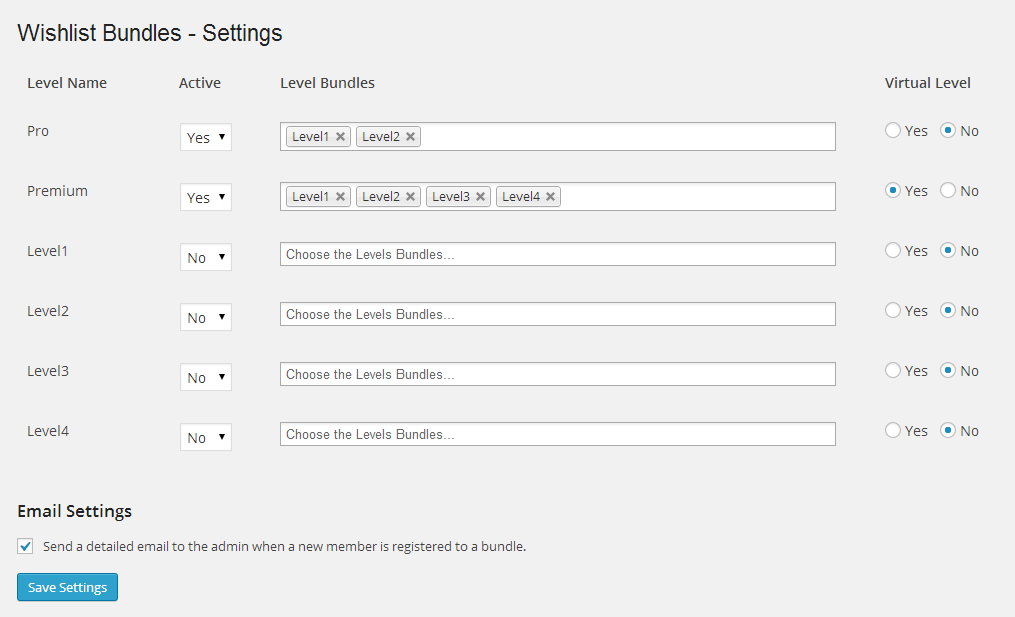
Although the regular Wishlist Member settings do allow you to create bundles, you can enhance your membership site's functionality and make it even more powerful using Wishlist Bundles unique abilities and features:
1. Creating "virtual levels" & having complete flexibility in creating any bundle combination you want
A virtual level is a level that exists for the sole purpose of bundling several membership levels together.
So, for example, if you set "Beginners Level" to be a virtual level that bundles the following levels as bundles: Module 1-5, it means that members who purchase the Beginners Level will be members of Modules 1-5 only.
Having the ability to set levels as "virtual" gives you complete flexibility in selling as many membership levels as you want and in as many combination you want.
2. Combining multiple levels without losing the ability of selling each level individually
If you have 3 membership levels (Level 1-3), you can sell each membership level as a stand-alone level, plus you can sell all 3 levels together as a bundle using the "virtual levels" feature.
For example: if you want to sell Level 1 both as an individual level and as part of a bundle you can do it like this:
- Setup 2 levels -"Level 1" and "Virtual Level 1"
- For the bundle - Set "Virtual Level 1" as virtual and associate it to the relevant levels in the "Level Bundles" field. This means that members will be registered only to the levels associated with "Virtual Level 1"
- For selling Level 1 individually - Leave "Level 1" as is (no unique settings are required within Wishlist Bundles. Members will be registered to Level 1 only
Smart Notifications Messages:
- Alerts when a "virtual level" doesn't contain any levels at all
- Alerts when a bundle created already includes a bundle inside
- Detailed admin email notifications when a bundle has been purchased
- Unique shortcode that allows displaying the bundle inside posts and pages
- Supports custom WordPress actions to enable developing custom extensions

Screenshots
- Sequential Upgrade feature
- From the Manage Membership Levels settings
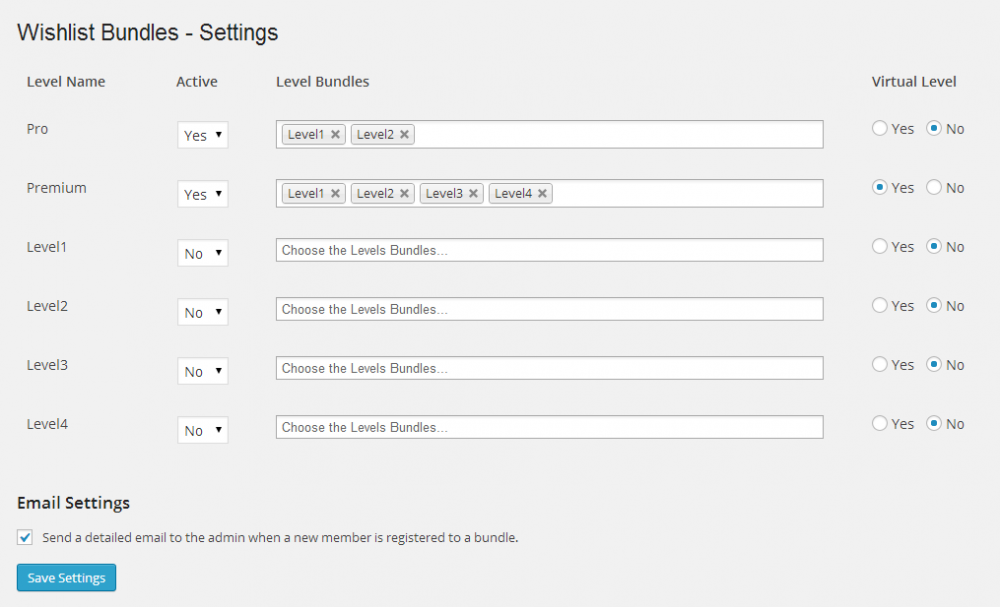
- Wishlist Bundles Settings Screen
Videos
Wishlist Bundles - Plugin Overview
Faqs
General
Although there is an option to use the Sequential Upgrade feature for creating bundles, however it is not the best solution and it makes the bundles option impossible in complex scenarios, for example: If you want to sell level 1 + level 2 + level 3 in different combinations and bundles, but you also want to sell each level individually. Also, using the Sequential Upgrade for multiple bundles can be very confusing an is presented in a non-visual way in the Sequential Upgrade settings, which can cause confusions and lead to creating wrong bundles.
Wishlist Bundles integrates with all the shopping carts supported by Wishlist Member plugin.
Creating a cart with check-boxes and dynamic prices is not possible since most payment gateways that Wishlist integrates with don’t support dynamic prices, only fixed buttons that are pre-defined inside the shopping cart.
As far as we know, the plugin does not conflict with any other plugin. Wishlist Bundles keeps a very strict code method so the chances that it's causing any problem are very low. If you have any problems or conflicts, please try to disable the plugin and see if the problem still exists. If it does, please contact our support helpdesk .
A virtual level is a level that exists for the sole purpose of bundling several membership levels together. For example: a virtual level called "Super Bundle" includes membership levels: Silver, Gold and Platinum.
No, Wishlist Bundles is a Wishlist Member dedicated plugin.