
Wishlist Membership Notifications
Description
Wishlist Membership Notifications is a powerful automatic notifications system that will increase the renewal rates to your membership site significantly.
Wishlist Membership Notifications allows you to send email notifications to members before and / or after their membership expires and increases their chances of renewing their subscription.
Sending your members notifications to let them know their membership is about to expire or has already expired will increase the chances of members to renew their subscription.
This means that your renewal and retention rates will increase significantly.
Is Wishlist Membership Notification Plugin Relevant for Me?
If you own a membership site with membership level/s with an expiration date then Wishlist Membership Notifications is a MUST-HAVE plugin for you if you want to in order for you to be able to manage a viable profitable business.
You can use the email notifications to alert members that their membership is about to / has expired and:
- An option to renew their existing membership
- An option to upgrade to a higher membership level
- Special incentives such as time-limited discounts
- Upsell them to other products / plans (for example, if you created an online course, you can send notifications to members who are about to finish the course with offers about complementary products)
And all these notifications will be sent to your members automatically according to their expiration date!
Wishlist Membership Notifications Exclusive Features
- Send up to 10 email notifications before and / or after the membership expires
- Choose as many membership levels as you like to send the notifications to
- Customize the notifications to your needs using WordPress toolbar and special merge codes
- Send test messages to see a preview of the notification
- Send the email in HTML / Text format
- See the exact notifications queue including: Member's name, Email, Membership Level, Notification Number, Date and Status (Send / Queued)
- Clear the notifications queue / delete all sent notifications
- Filter the queue according to members / dates / membership levels / notifications / status / free search
- Control the number of notification sent per hour
- Update the Notifications Queue list every hour/ when cron job executes
Wishlist Member vs. Wishlist Membership Notifications
Wishlist Membership Notifications plugin empowers the core Wishlist Member plugin with its exclusive and powerful features.
Here is a complete comparison between Wishlist Member "Expiring Member Notification" feature (In Wishlist Member menu > settings > Email Settings) and Wishlist Membership Notifications plugin.
Feature | Wishlist Member "Expiring Member Notification" Feature | Wishlist Membership Notifications Plugin |
|---|---|---|
Number of Notifications that Can be Sent | Only 1 | 1 to 10 |
Timing of the Notifications Sent | Before expiration date | Before and / or after expiration date |
Ability to Select Membership Levels to Send Notifications to | No | Yes |
Ability to Customize the Email Notification Message | Partly (Using Wishlist Member merge codes) | Complete WordPress visual editor toolbar + Wishlist Member merge codes |
Ability to Get Reports on the Notifications Sent | No | Yes (complete notifications queue) |
Ability to Send Test Messages to Preview the Notifications | No | Yes |
Control the No. of Notifications Sent per Hour | Partly (General No. for all types of emails) | Yes, dedicated settings for notifications (between 1 to 500) |
Using the Plugin:
Click on each screenshot to enlarge it
General Email Notifications Settings
In the Settings tab you can define the general settings of the email notifications sent:
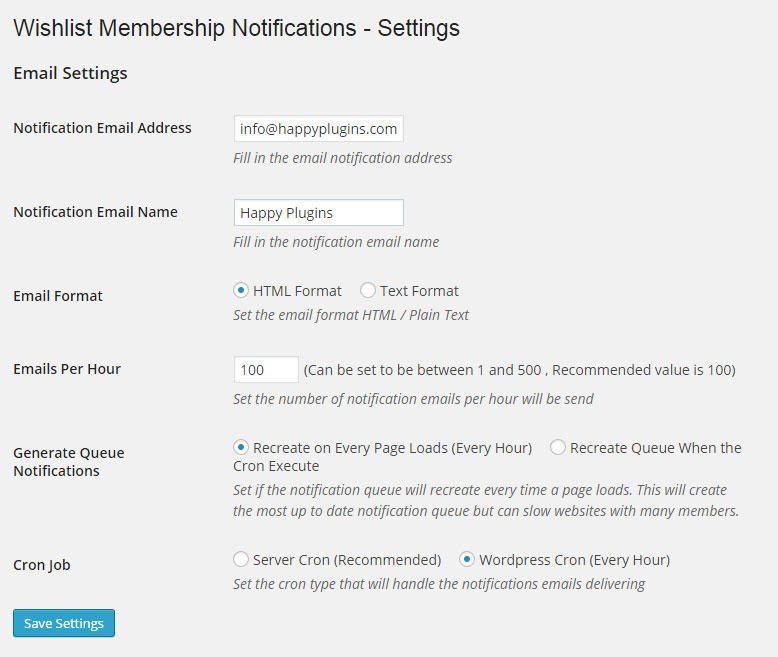
Notifications Messages Settings
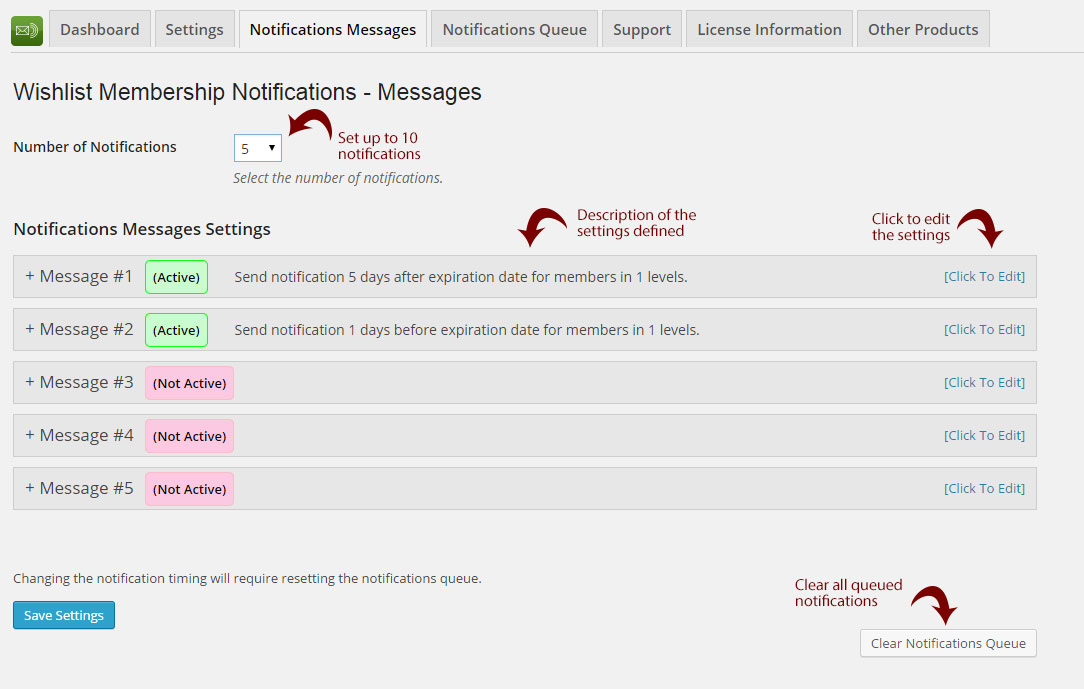
In the Notifications Messages tab you can set up to 10 email notifications and customize them to your needs.
Messages Overview Screenshot:
Editing an Email Notification Message:

Notifications Queue Report
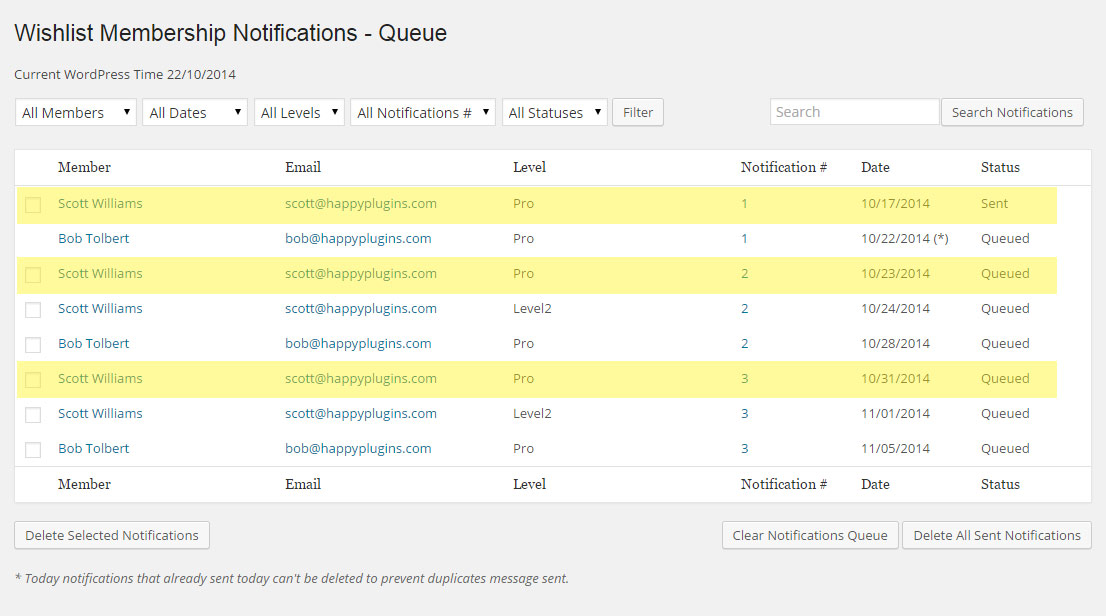
Under the Notifications Queue tab you will be able to see a complete report of the email notifications sent / queued.
There are 3 main statuses:
- Sent - The email has already been sent
- Queued (*) - The email is going to be sent today
- Queued - The email will be sent in the future (according to the date specified)
Examples:
Pro level is set to expire after 30 days
Scott Williams details:
Registration date > 9/24/14
Expiration date > 10/24/14
Email Notifications for Scott Williams for the Pro Level:
| Notification # | Notification Messages | Notification Queue Status | Notification Due Date |
|---|---|---|---|
| 1 | 7 days before expiration | Sent | 10/17/14 |
| 2 | 1 day before expiration | Queued | 10/23/14 |
| 3 | 7 days after expiration | Queued | 10/31/14 |
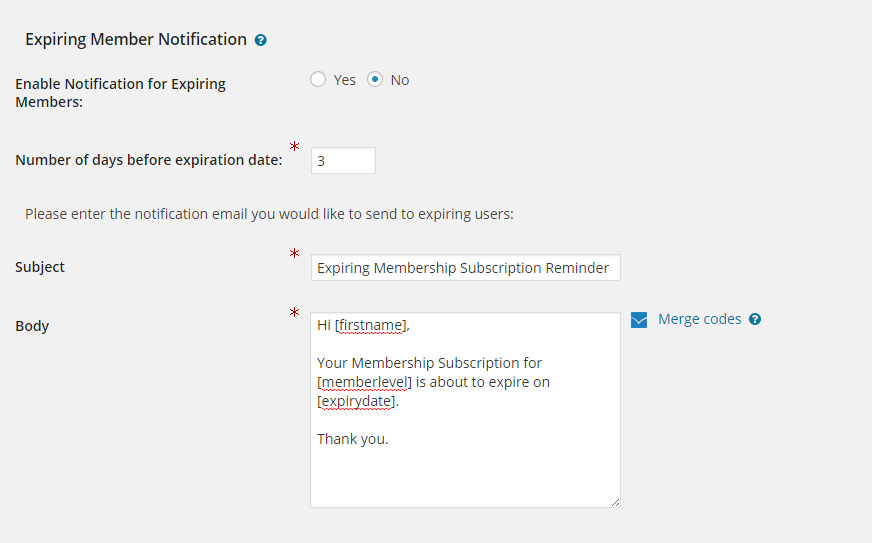
Default Wishlist Member Email Notification Feature
This is the default email notification options as you can find in the Wishlist Member menu > Settings tab > Email Settings.
You can view the complete comparison between Wishlist Member email notifications feature and Wishlist Membership Notifications plugin in the Description tab
Screenshots
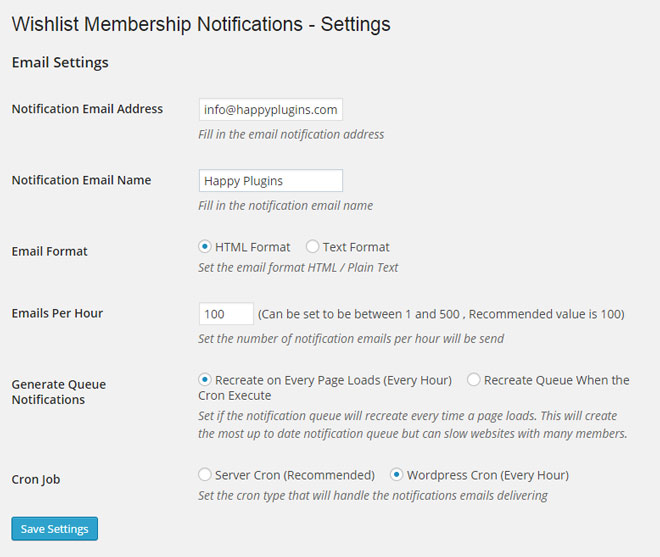 General Email Notifications Settings
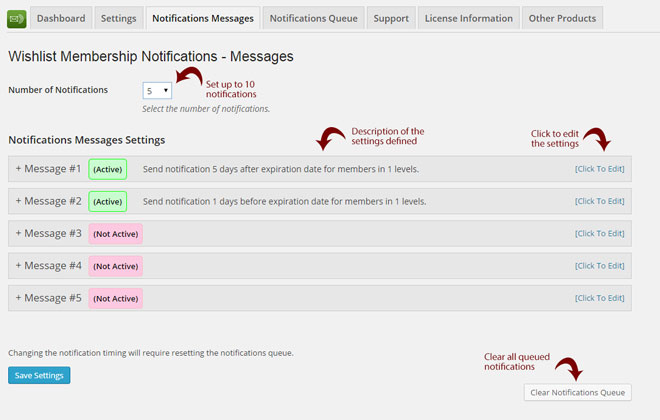 Notifications Messages Settings
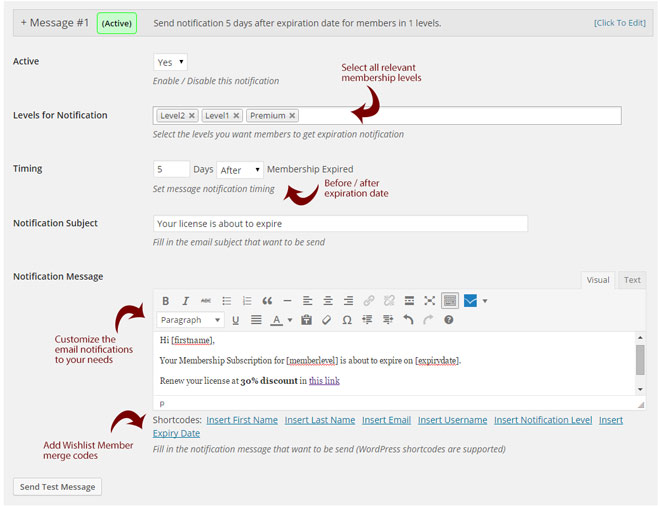 Editing an Email Notification Message
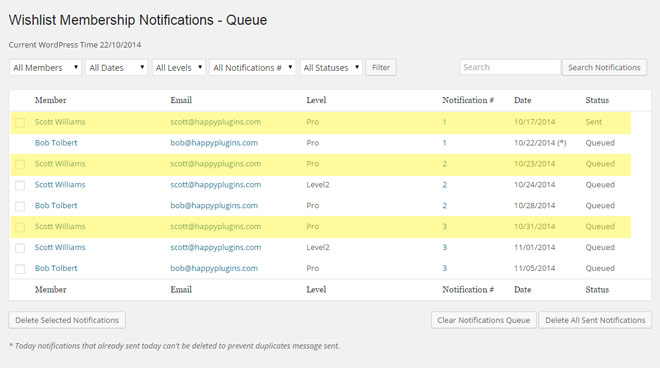 Notifications Queue Report
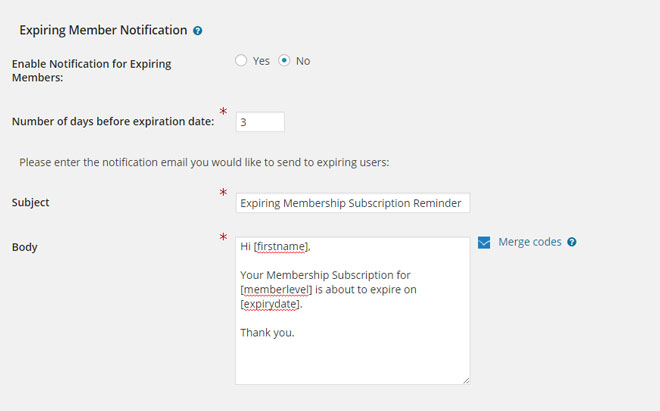 Expiring Members Feature
Videos
Wishlist Membership Notifications - Plugin Overview
Faqs
General
Wishlist Membership Notifications is relevant to any membership site that has an expiration date and that members need to renew their membership in order to maintain access to the protected content.
Once you have activated the Wishlist Membership Notifications plugin and define its settings and messages in the Notifications Messages tab, the plugin will automatically send notifications to ALL members whose membership is about to expire, including existing members.
Compatibility
Yes it does. We are using WordPress internal function to send the notifications and we are using it in a way that complies with the Mandrill service.
There is not any problem with sending emails from your own server and you will not get blacklisted by doing so. The problem with getting blacklisted is when you send unsolicited emails (spam). As long as you are sending emails to members who have signed up to your site, you will not get blacklisted.
No, Wishlist Membership Notifications is a Wishlist Member dedicated plugin.
Pricing
Wishlist Membership Notifications is evolving all the time and new features are added on a regular basis. The only way to ensure that we can continue developing the plugin and invest resources and efforts in bringing new features to the plugin is by using a monthly subscription model.
Technical
As far as we know, Wishlist Membership Notifications does not conflict with any other plugin. It keeps a very strict coding standard that prevents any conflicts with other plugins.