

“Want to integrate a forum with your membership site? Now you can do it easily with WishList Member, thanks to the super devs over at Happy Plugins. I’ve worked with Bob Tolbert and his team there for a few years and I’m very excited about the new plugin they’ve created. I’ll likely be adding this bbPress integration plugin to the Webmaster Training site in the near future. I think it will be super for all of us webmasters to help one another.”
MaAnna Stephenson, Owner of BlogAid.net
Description
Wishlist Member bbPress Protection is a unique plugin that protects both new and existing forums, topics and replies so only members in the levels you specify can access.
Without Wishlist Member bbPress Protection plugin there is no option to automatically protect topics and replies within each forum.
Without this plugin you will need to enter each topic and reply that is created by your forum members and define their protection settings manually, which is impossible to do.
Exclusive Features:
- Protects all new forums, topics and replies created inside the bbPress forum
- Every new topic and reply that is added to a specific forum will automatically inherit their parent forum’s protection settings
- Protects all existing topics and replies inside the bbPress forum in just 1-click
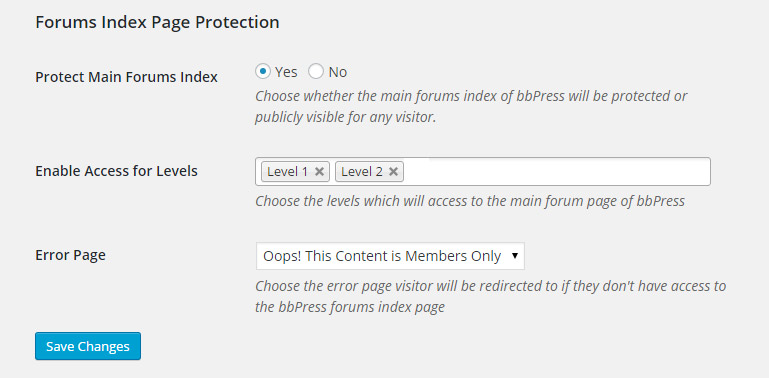
- Protects the main forum index page (E.g. http://yourdomain.com/members-forum)
- Allows you to grant access to the main index page only to specific membership levels you define
- Allows you to define an error page non-members will be redirected to when they try to access the main index page
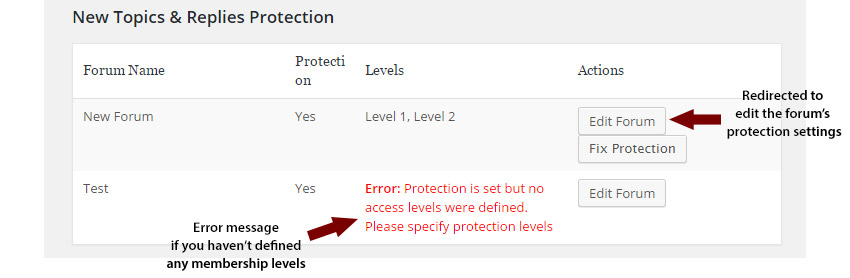
- Displays a summary table with all the forums, theirs status (protected: Yes/ No), membership levels and actions you can perform (edit forum’s protection settings / fix protection for existing topics and replies)
- Displays an error message if you have protected the forum, but haven’t defined the membership levels
Screenshots & Explanations:
Enabling Custom Post Types for bbPress
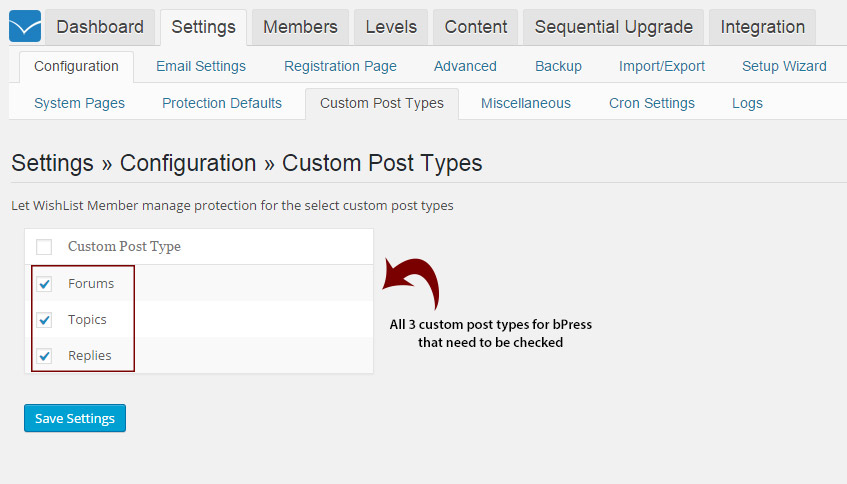
In order to integrate Wishlist Member with bbPress custom post types (forums, topics and replies) you need to go to Wishlist Member settings >> Custom Post Types >> Check the relevant custom post types for bbPress as seen in the screenshot below:
If you haven’t defined all of the bbPress custom post types, Wishlist bbPress Protection plugin will take care of that for you by notifying you and giving you the option to automatically check them in 1-click only as seen in the below screenshot:
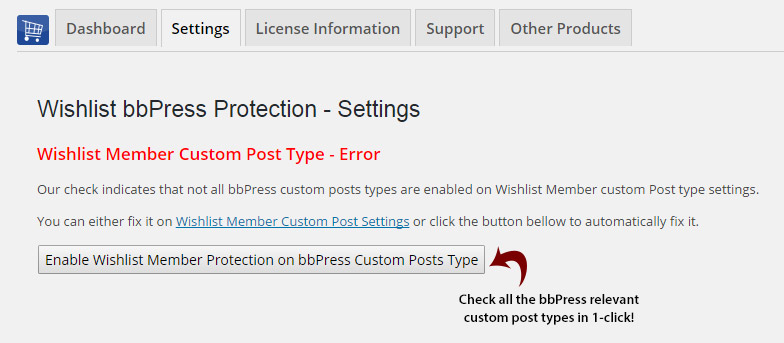
After you click the button all the settings as explained further down below will appear under the Settings tab.
Automatically Inherit Parent Forum Protection Settings for New Topics and Replies
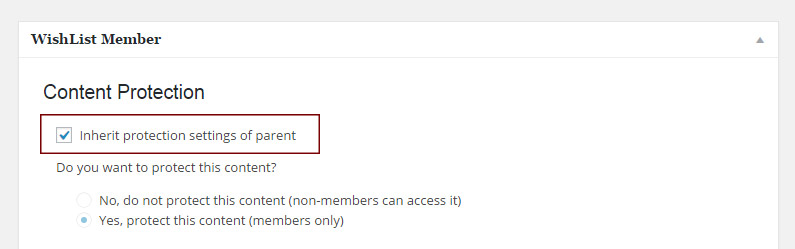
All new topics and replies will inherit their parent forum’s protection settings automatically. You can check that this feature is working by entering a specific topic or reply and under the Wishlist Member Meta box see that the “inherit protection settings of parent” check-box is checked:

Protecting Existing Topics and Replies in 1-Click
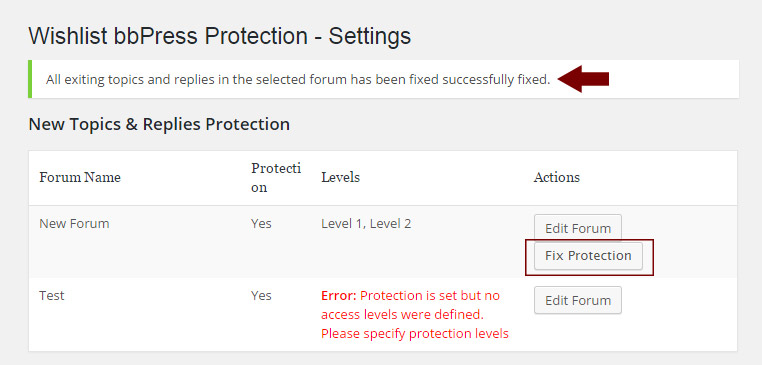
You can easily protect all existing topics and replies by clicking the “Fix Protection” button and a message will let you know the protection is complete:
Protect the Main Forum Index Page
You can protect the main forum’s index page, define which membership levels has access to it and an error page for non-member in one simple settings screen:
A Summary Table about all Forums, Topics and Replies
You get a complete overview of your forums, topics and replies statuses as seen in the screenshot below and perform different actions in 1-click from within the table.
You can also edit the forum’s protection settings by clicking the “Edit Forum” button and you will be redirected to the Wishlist Member Meta box inside the forum (when editing the forum) and you get an error message if you haven’t specified any membership levels to the forum:
Wishlist Member Meta Box for Editing the Forum
You will be redirected to edit the forum’s protection settings by clicking on the Edit Forum button as seen in the above screenshot.

FAQs
Does the plugin have any conflicts with other plugins?
As far as we know, the plugin does not conflict with any other plugin. Wishlist Member bbPress Protection plugin keeps a very strict code method so the chances that it’s causing any problem are very low. If you have any problems or conflicts, please contact the support department.
Does the plugin integrate with every membership site platform?
No, Wishlist Member bbPress Protection is a Wishlist Member dedicated plugin.
I have more questions and I haven’t found my answers, how can I contact you?
If you haven’t found your answers in the product’s page or manual, please contact our support team and we will get back to you shortly.