
Description
Wishlist Drip Dynamic Shortcodes allows you to display (drip) / hide (archive) content based on the members’ registration date, membership level and the time passed since the registration using simple yet powerful shortcodes.
All you need to do in order to display / hide content is to copy-paste the shortcodes into your chosen post or page and set the parameters (specified below) inside the shortcode.
Why is Wishlist Drip Dynamic Shortcodes So Powerful?
Using Wishlist Drip Dynamic Shortcodes your members will be able to see which content will be available to them in the future (when using the “drip” shortcode) / will no longer be available (when using the “hide” shortcode) and will encourage them to engage with your content.
No other drip plugin allows your members to “see the big picture” and know exactly when the content will be available to them.
The Shortcodes
Use these shortcodes to display / hide content to / from more than one membership level:
The Parameters
Videos
Video 1 – How to Drip Content in One Single Page:
In this video we demonstrate how you can drip content in one single post or page.
So that each piece of content will be revealed to members periodically and dynamically according to each member’s registration date.
I created a mini course with 7 lessons, every 7 days a new lesson is revealed.
The goal is to attract members to register to the mini course, watch it and engage with the content, so they will want to purchase other services and / or course we offer.
Video 2 – How to Hide Content from WishList Members after any Period of Time to Create Urgency
In this video we demonstrate how you can hide specific content from members after any number of days according to their membership level and registration date.
This means that members will be able to view the content for limited time only, and the content will be archived so the member will no longer be able to view it.
This feature can be easily achieved using our plugin WishList Drip Dynamic Shortcodes that allows you to drip or hide any piece of content after any number of days or on a specific date according to the member’s registration date.
Video 3 – Using Wishlist Drip Dynamic Shortcodes with Elementor or any Other Page Builder
One of the most common questions we get is: Can the shortcodes be placed inside page builders, such as: Elementor, Divi by Elegant Themes, OptimizePress etc.
The answer is – YES!
In this video we demonstrate how you can use the Wishlist Drip Dynamic Shortcodes inside Elementor page builder, and basically in any page builder you like:
Screenshots
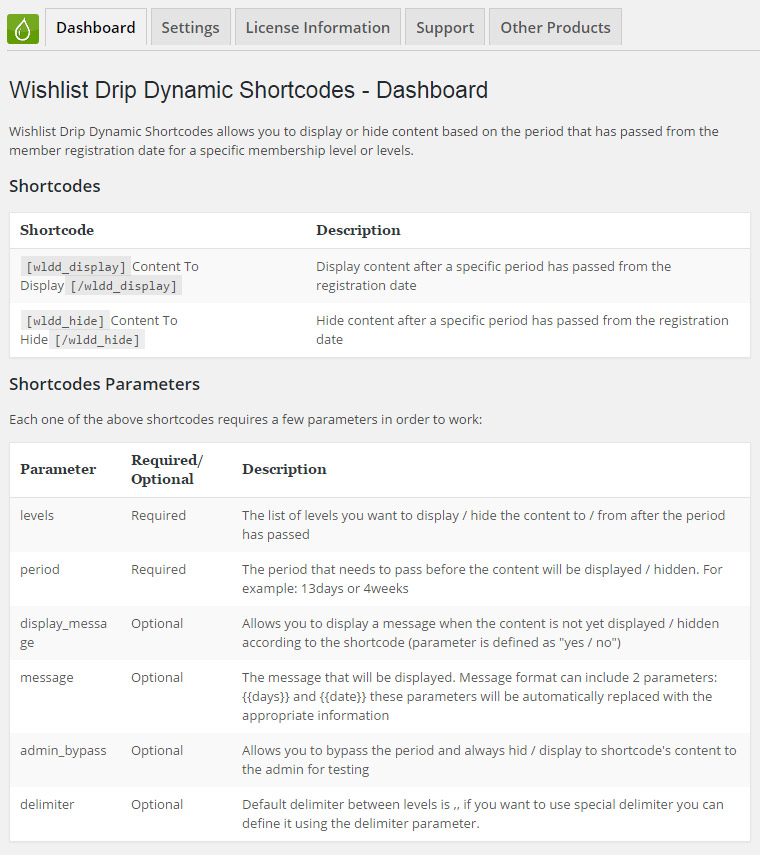
The Dashboard Tab
In the Dashboard tab you will also see all the shortcodes and parameters in organized tables so you will only need to copy and paste them to your chosen posts and pages.
Displaying Content Dynamically
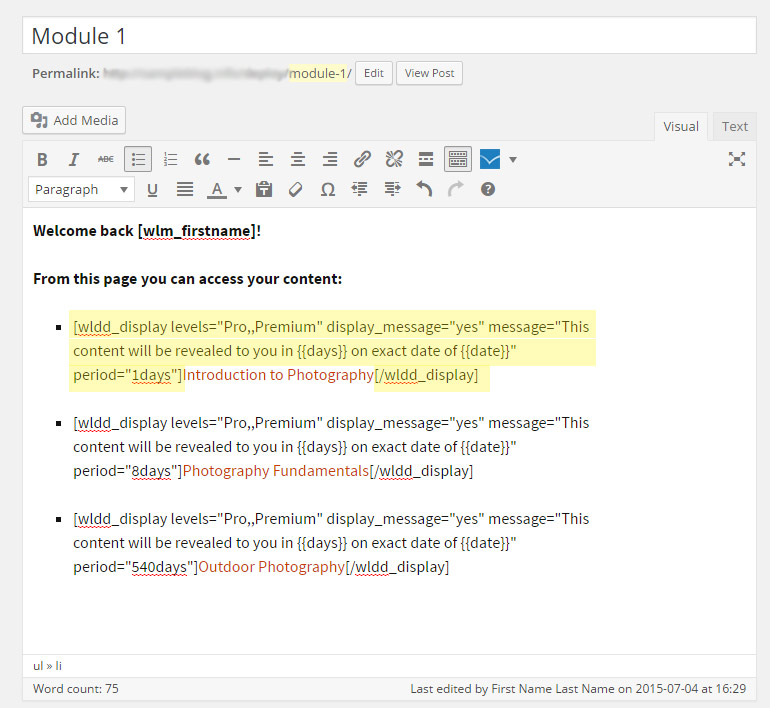
Here is an example of how you can dynamically display content – back end and front end
Back-end screenshot:
Front-end Screenshot:

Summary Table
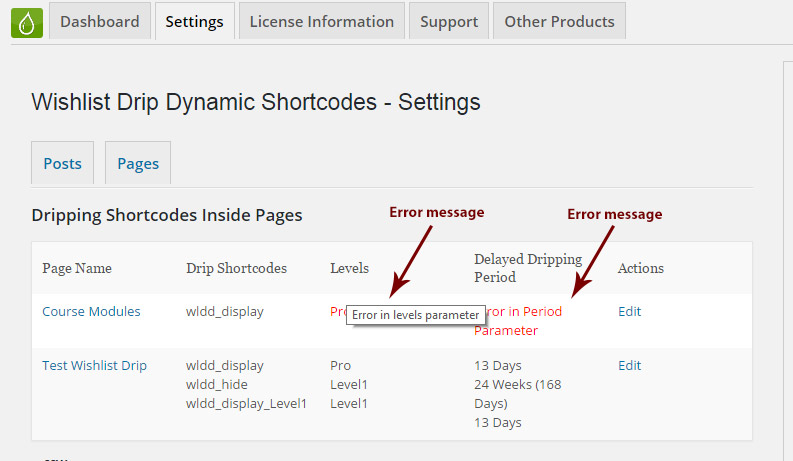
Wishlist Drip Dynamic Shortcodes also allows you to see all the posts and pages that contain the plugin’s shortcodes and even edit each post / page by clicking on the “Edit” link that will redirect you to edit the post or page.
As you can also see in the screenshot below, if the information inside the shortcode is incorrect, an error message will be displayed to you in the table:
FAQs
Can the shortcodes work inside other shortcodes?
Yes, it’s possible to use the shortcodes inside other shortcodes.
Can the shortcodes work in sidebar widgets?
Yes, you will need to use the plugin Shortcodes Anywhere (free plugin)
Does the shortcodes work with custom post types?
Yes.
Does the plugin have any conflicts with other plugins?
As far as we know, the plugin does not conflict with any other plugin. Wishlist Drip Dynamic Shortcodes plugin keeps a very strict code method so the chances that it’s causing any problem are very low. If you have any problems or conflicts, please contact the support department.
Does the plugin integrate with every membership site platform?
No, Wishlist Drip Dynamic Shortcodes is a Wishlist Member dedicated plugin.
I have more questions and I haven’t found my answers, how can I contact you?
If you haven’t found your answers in the product’s page or manual, please contact our support team and we will get back to you shortly.
Plugins Suite (30% off)
Get the Wishlist Member Uber Plugins Suit at 30% Discount!
Interested in Wishlist Drip Dynamic Shortcodes?
Save up to $182 by purchasing the Uber Plugins Suite!
The UBER Plugins Suit includes our top 5 Wishlist Member dedicated plugins that will boost your membership site with powerful features and boost your revenues, including:
- Wishlist Drip Dynamic Shortcodes
- Wishlist Auto Protect Pro
- Wishlist 1-Click Registration
- Wishlist Registration Widget (Premium Version)
- Wishlist First Login Redirection