
EDD Single Downloads Widget
Description
Easy Digital Downloads Single Download Widget allows you to add unique widget to display specific information about each single download.
This information changes dynamically from one single download to another and it can display any type of information you want, for example, to display links to important information such as:
- Documentation
- Video tutorials
- Manuals
- Testimonials
- etc.
The advantage of displaying the information in the sidebar instead of in the download page itself is that the information will be displayed in a more visible location and in one unchanging place on each page that will make it easier for your visitors to find it, as each download page may be designed differently.
How the Plugin Displays the Information?
Displaying the correct information to each single download is done in a very simple way using a unique Meta box that appears on every Edit Single Download page.
All you need to do is:
- Fill-in the information you want for each download in the Meta box
- Add the EDD Single Download Widget to the relevant sidebar
That's it! The content will change dynamically according to the download page displayed on the screen
Features
Managing your single downloads' information is simple and easy, as you can see in the screenshots below:
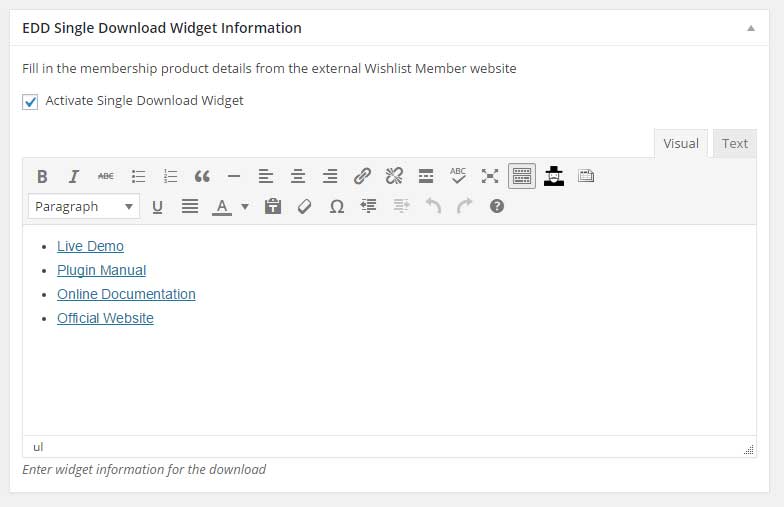
The Single Download Meta Box
To display specific information for each single download all you need to do is enter the Edit Single Download page > Go to the EDD Single Download Widget Information Meta box > Add the relevant information:
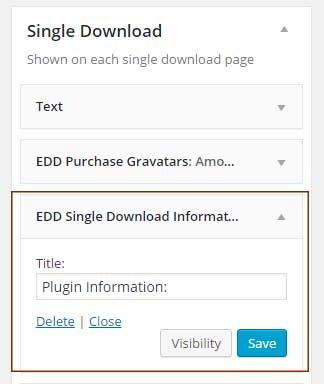
The Sidebar Widget
After you have added the Meta box information for your chosen downloads, in order for them to be displayed all you need to do is add the EDD Single Download Information widget to any sidebar:
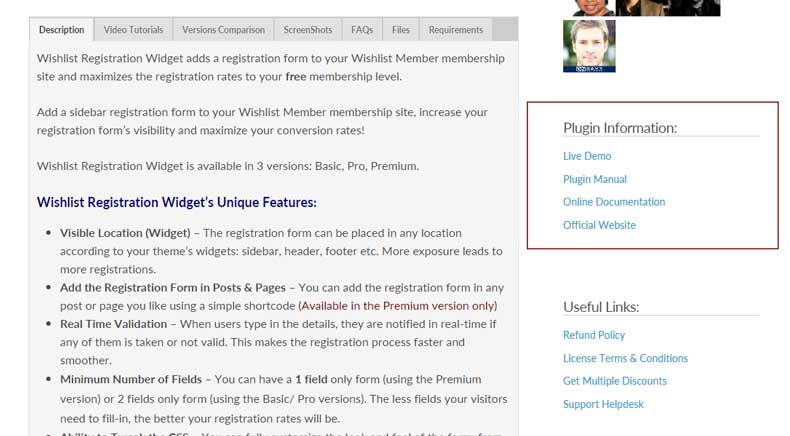
The Single Download Front End
Here is an example from our website of how the information looks in the front-end.
You can also see in the right side of the EDD Single Downloads Widget the widget with the plugin's information widget.
You can customize the look and feel to your needs and according to your website's theme:
Screenshots
- EDD Single Download Widget Information Meta box
- EDD Single Download Widget Sidebar
- Single Download Front End
Faqs
General
If you don't add any information to specific downloads then no information will be displayed when entering them.
Yes, you can add the widget to any sidebar supported by your theme, the only requirement is that the specific sidebar is displayed in the Single Download template. This is defined by your theme developer or by your theme's settings.
As far as we know, the plugin does not conflict with any other plugin. Easy Digital Download Single Download Widget keeps a very strict code method so the chances that it’s causing any problem are very low. If you have any problems or conflicts, please contact the support department .