

Description
Wishlist 1-Click Registration allows you to register new members or upgrade existing members to any free membership level by doing only one action – clicking a link!
So once a user clicks on the link, he will be automatically registered to your chosen membership level as defined inside the plugin’s settings.
Wishlist 1-Click Registration supports all autoresponders that integrate with Wishlist Member!
The 1-Click Registration Process:
User clicks on the registration link > User is registered and logged-in to the membership level you specified in the plugin’s settings
Exclusive Registration Links:
With Wishlist 1-Click Registration you can create different and unique registration links.
When a user clicks on the registration link he is automatically registered to the membership level you defined in the plugin’s settings.
1. Autoresponder Registration Link
Add a unique registration link in emails you send to your mailing list and register them automatically to your Wishlist membership site.
Wishlist 1 Click Registration plugin supports all the autoresponders that integrate with Wishlist Member:

2. Roll Members from One Membership Site to Another Registration Link
Roll users from one Wishlist membership site to another by using a unique registration link
3. Add a 3-fields Only Signup Form Inside Any Post or Page
The signup form includes: these fields: first name, last name and email.
The username and password are generated automatically and are being sent through email.
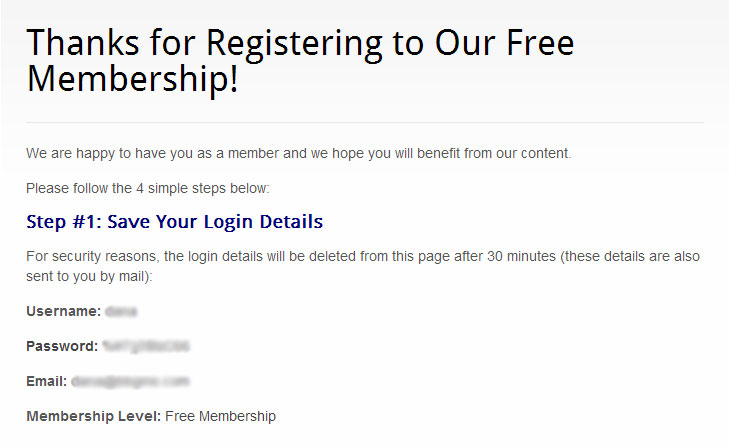
Plus, you can add shortcodes to display the login details to members in the after registration page.
* See the complete list of shortcodes in the “Screenshots” tab
Exclusive Links Settings:
- Select the membership level the users will be registered to when they click on the 1-click registration link
- Select the autoresponder you are using to generate the correct link so users will be able to automatically register through newsletters you send them
- Select the After Registration page or leave it at the default
- Add a transaction ID (optional) that will represent the registration source (appears in the Users menu >> Edit User)
- Define an automatic login after registration to be Yes / No
- Set an expiration date for the link (optional) to create urgency
* See screenshot in the “Screenshots” tab
General Settings:
- Set a “Link Expired” error page users will be redirected to when the link you created expires
- Set a general error page users will be redirected to in case of an error
- Get admin email notification every time a new user registers through a 1-click registration link
- Set a new members username format to be First & last name or email prefix
* See screenshot in the “Screenshots” tab
View the complete documentation of Wishlist 1-Click Registration
Get Our Wishlist Registration Powerpack at 15% Discount!
The Wishlist Registration Powerpack includes our top 3 registration plugins that will make your registration rates SKY ROCKET!
Click on each plugin to get all the information about it including a short demo video:
- Wishlist Greeting Registration (Worth $67)
- Wishlist 1-Click Registration (Worth $47)
- Wishlist Registration Widget (Premium Version) (Worth $57)
Check out Wishlist Registration Powerpack

Video Tutorials
How to Automatically Register Members straight from Your Autoresponder to Your Wishlist Member Membership Site in 1-Click:
In this video we go over how to automatically register members to your membership site straight from your autoresponder using the autoresponder registration link feature:
[leadplayer_vid id=”56D0105588BDB”]How to Automatically Roll Members from One Membership Site to Another in 1-Click:
Iin this video we go over how to automatically roll members from one membership site to another using the roll members registration feature:
[leadplayer_vid id=”56D010A505AEF”]Screenshots
Back-end Screenshots:
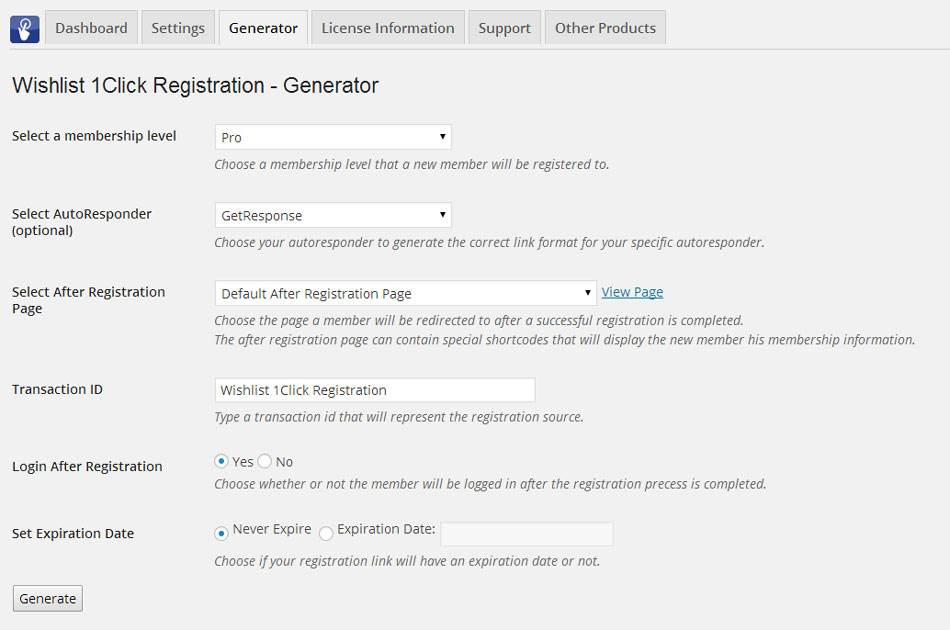
Exclusive Links Settings
- Select the membership level the users will be registered to when they click on the 1-click registration link
- Select the autoresponder you are using to generate the correct link so users will be able to automatically register through newsletters you send them
- Select the After Registration page or leave it at the default
- Add a transaction ID (optional) that will represent the registration source (appears in the Users menu >> Edit User)
- Define an automatic login after registration to be Yes / No
- Set an expiration date for the link (optional) to create urgency
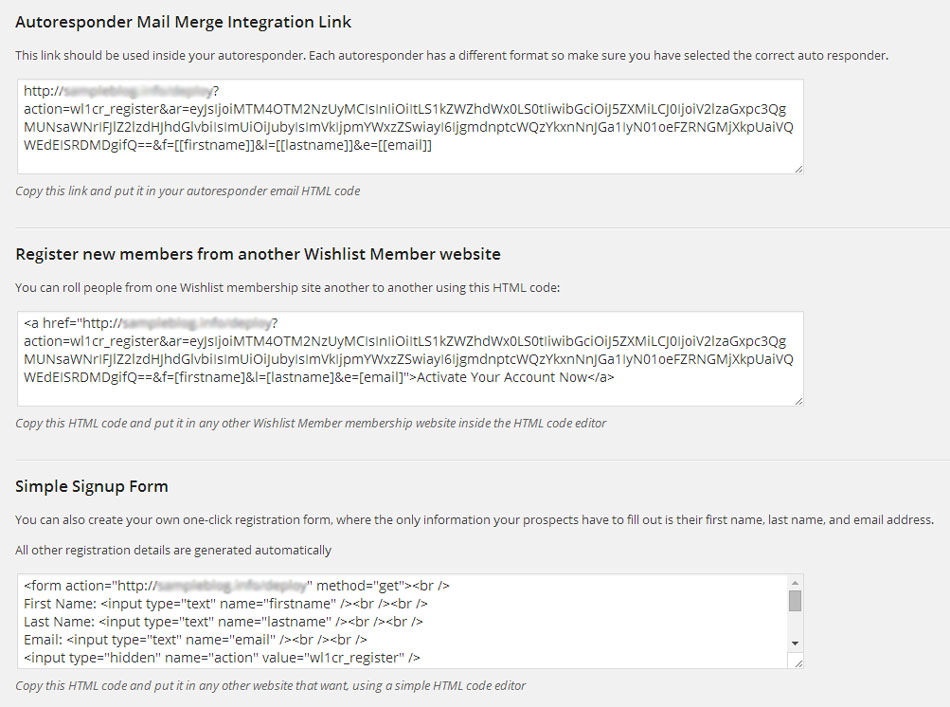
When clicking on the Generator button you will get the 1-click registration links:
- Autoresponder registration link – Supports all autoresponders and registers members directly from emails you send to your mailing lists in 1 click only
- Roll members from one membership site to another – Use a unique link to do it in just 1 click
- Add a 3-fields only signup form in every post or page you like – Members are registered in 1 Click only
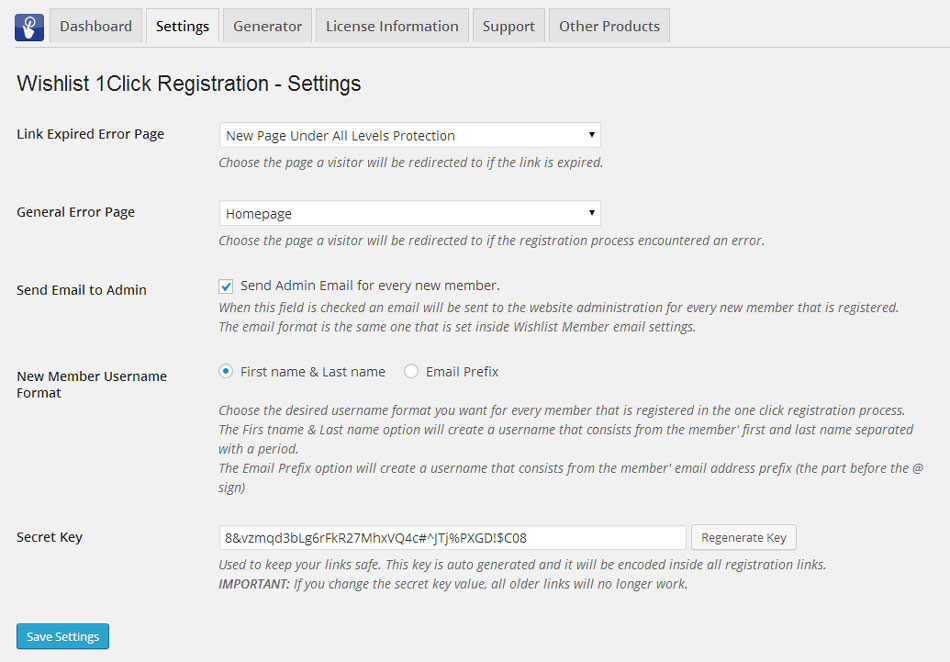
General Settings Tab
- Set a “Link Expired” error page users will be redirected to when the link you created expires
- Set a general error page users will be redirected to in case of an error
- Get admin email notification every time a new user registers through a 1-click registration link
- Set a new members username format to be First & last name or email prefix
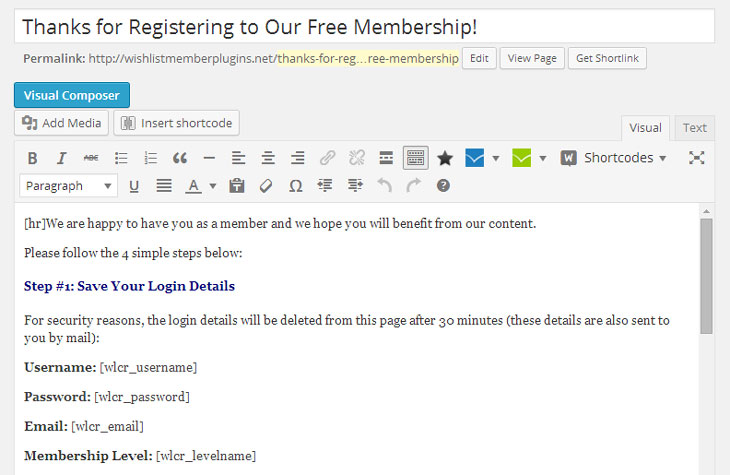
The Shortcodes for the After Registration Page
Important: Since the information displayed in the shortcodes is sensitive, it will be available for 30 minutes from the first time the page was loaded. Please add a note to your members to save the information on their computer.

View the complete documentation of Wishlist 1-Click Registration
Front-end Screenshots:
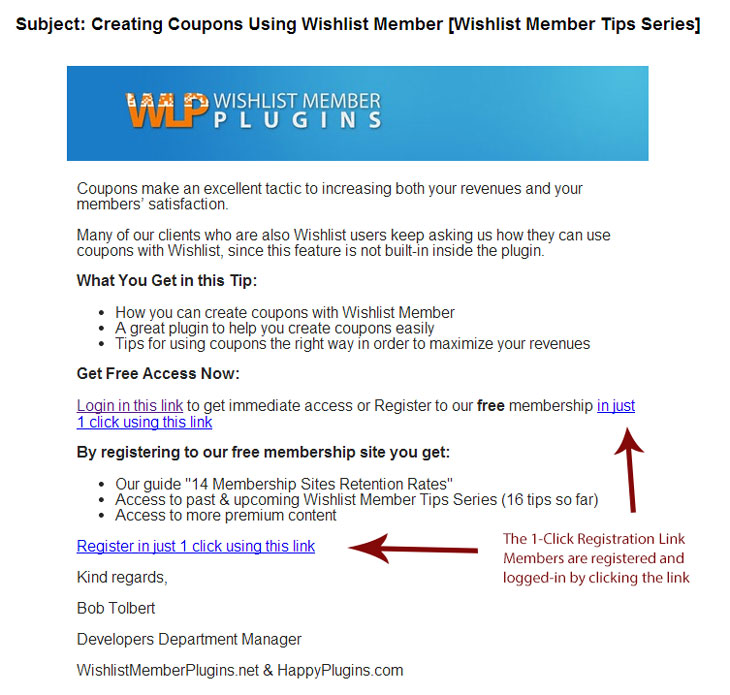
Registration Link for Autoresponders
You can add the link inside any email you send to automatically register members to your site. See example below:
The 3-fields Registration Form
The signup form includes 3 fields only, no need to fill-in password and username. They are automatically generated and sent to the member’s email. Also, the form is created using clean HTML code, so it can be design in any way that you want using basic HTML and CSS knowledge:
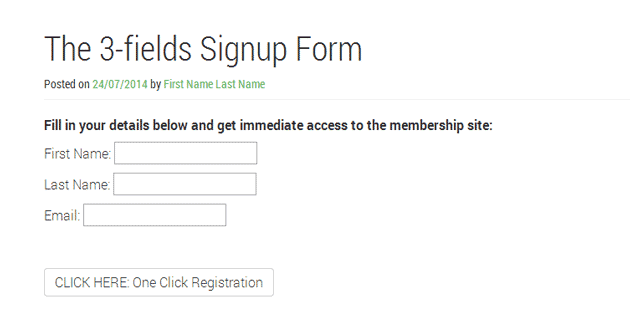
The Signup Form with HTML Code Tweaks
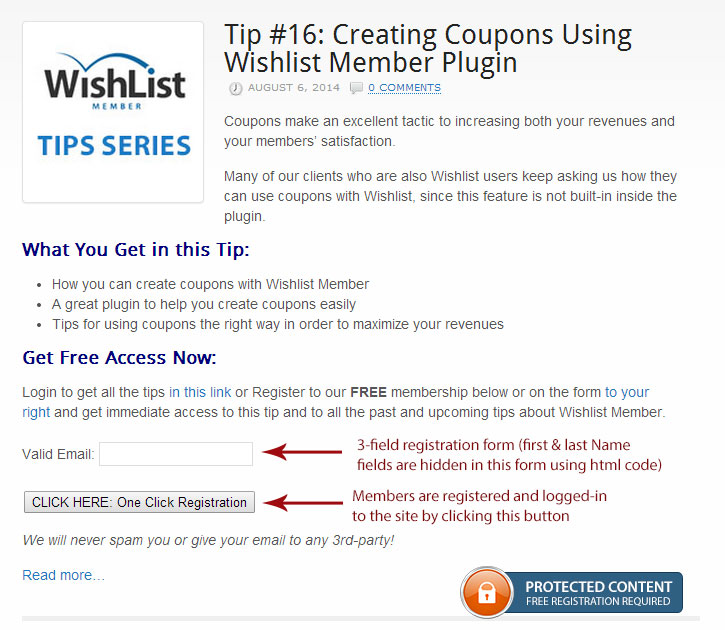
You can do simple HTML changes to tweak to signup form to your needs. Members are registered and logged-in by clicking the button as seen below:
The Thank You Page after the 1-Click Registration
Back-end Thank You Page:
Front-end Thank You Page:
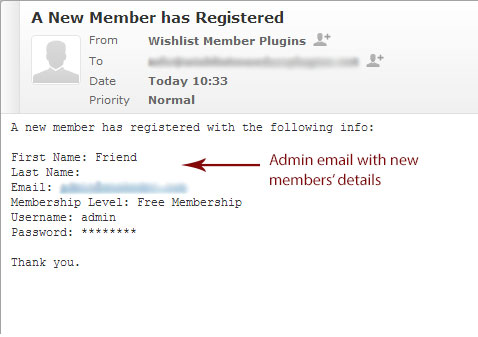
Admin Email for Registrations Notifications
In this screenshot we tweaked the HTML code to hide the first & last name and to display First Name field as: Friend and Last Name field as empty:
View the complete documentation of Wishlist 1-Click Registration
1-Minute How to Videos
How to Register Email Subscribers to Your Free Wishlist Membership Simply by Clicking a Link?
[leadplayer_vid id=”5A2F9B7D125D7″]How to Register Members to Another Wishlist Membership Site in 1-Click!
[leadplayer_vid id=”5A3237AB11E73″]FAQs
Can Wishlist 1-Click Registration plugin be used for paid membership levels as well?
No, the plugin works for free membership levels only. For paid memberships we developed Wishlist Auto Registration plugin.
Which autoresponders the plugin supports?
The plugin supports all the autoresponders that integrate with Wishlist Member: GetResponse, Aweber, InfusionSoft, MailChimp, ArpReach (AutoResponse Plus), iContact, InterSpire, ConstantContact, ActiveCampaign, ListMailPro and Mad Mimi.
Can I change the after registration redirection page?
Yes, you can set a different redirection page to each membership level separately simply and easily from the plugin’s Generator tab under “Select After Registration Page”.
Does Wishlist 1-Click Registration integrate with ConvertKit?
Yes, using this plugin you can integrate ConvertKit with Wishlist Member, so Wishlist 1-Click Registration should also work with ConvertKit with no issues.
You can check this article for more information on how to use ConvertKit with Wishlist 1-Click Registration.
Can Wishlist 1-Click Registration work with any membership plugin?
No, Wishlist 1-Click Registration is a Wishlist Member dedicated plugin.
What is the different between Wishlist Member regular signup form and the 1-Click Registration plugin signup form?
In the 1-Click Registration signup form there are only 3 fields, no need to fill-in password and username. They are automatically generated. Also, the field is created using clean HTML code, so it can be design in any way that you want using basic HTML and CSS knowledge. Please note that we do not support design-related questions.
Can I have the 1-click signup form to display less than 3 fields?
Sure, you can choose to display only the email field or even the email + first name fields with simple html tweaks. We explain how it can be done in the plugin’s manual.
How will members get their login details?
Members will get their login details straight to their email. Also, Wishlist 1-Click Registration allows you to add simple shortcodes to the After Registration page with the log-in details and they will be available for 30 minutes (for security reasons), so they have enough time to save them.
What details can I display members using the shortcodes?
Username, first name, last name, password (auto-generated), registration email, level name, action (new/ upgrade) and a content box with a message for new members and existing members that upgraded their membership.
View the complete documentation of Wishlist 1-Click Registration
Plugins Suite (30% off)
Get the Wishlist Member Uber Plugins Suit at 30% Discount!
Interested in Wishlist 1-Click Registration?
Save up to $182 by purchasing the Uber Plugins Suite!
The UBER Plugins Suit includes our top 5 Wishlist Member dedicated plugins that will boost your membership site with powerful features and boost your revenues, including:
- Wishlist 1-Click Registration
- Wishlist Auto Protect Pro
- Wishlist Drip Dynamic Shortcodes
- Wishlist Registration Widget (Premium Version)
- Wishlist First Login Redirection